
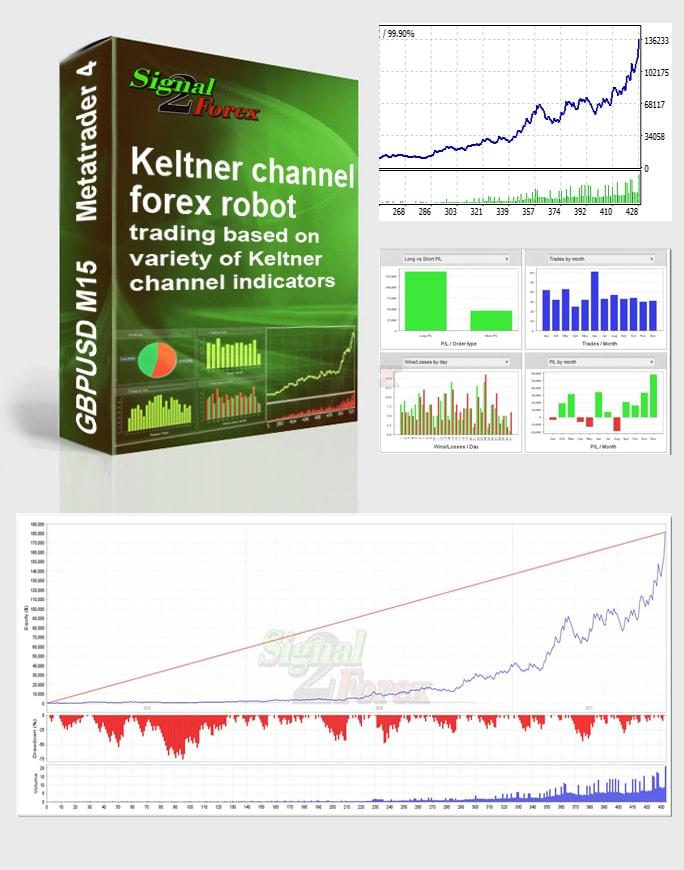



Keltner Channel EA: MT4 Robot for GBPUSD Trade 2026
$49.00
System: Metatrader 4
Needed indicators: in zip archive
Timeframe: M15
Currency pair: GBPUSD
Limits by accounts: No
Broker account: any
Type of trading: Middle-term
Moneymanagement: yes
Max. spreads allowed: 4 (40)
TakeProfit and StopLoss max used: 153(SL), 478(TP)
You can download TEST VERSION: Keltner channel FREE

Description
📑 Table of Contents
1. What Is the Keltner Channel Forex Robot?
The Keltner Channel Forex Robot is an Expert Advisor (EA) for MetaTrader 4 (MT4) that automates trading based on the powerful Keltner Channel indicator. Developed by Chester W. Keltner in 1960, the Keltner Channel is a volatility-based indicator that consists of three lines: a central exponential moving average (EMA), and upper and lower bands calculated using the Average True Range (ATR). This EA leverages these bands to generate high-probability trading signals on the GBPUSD currency pair using the M15 (15-minute) timeframe.
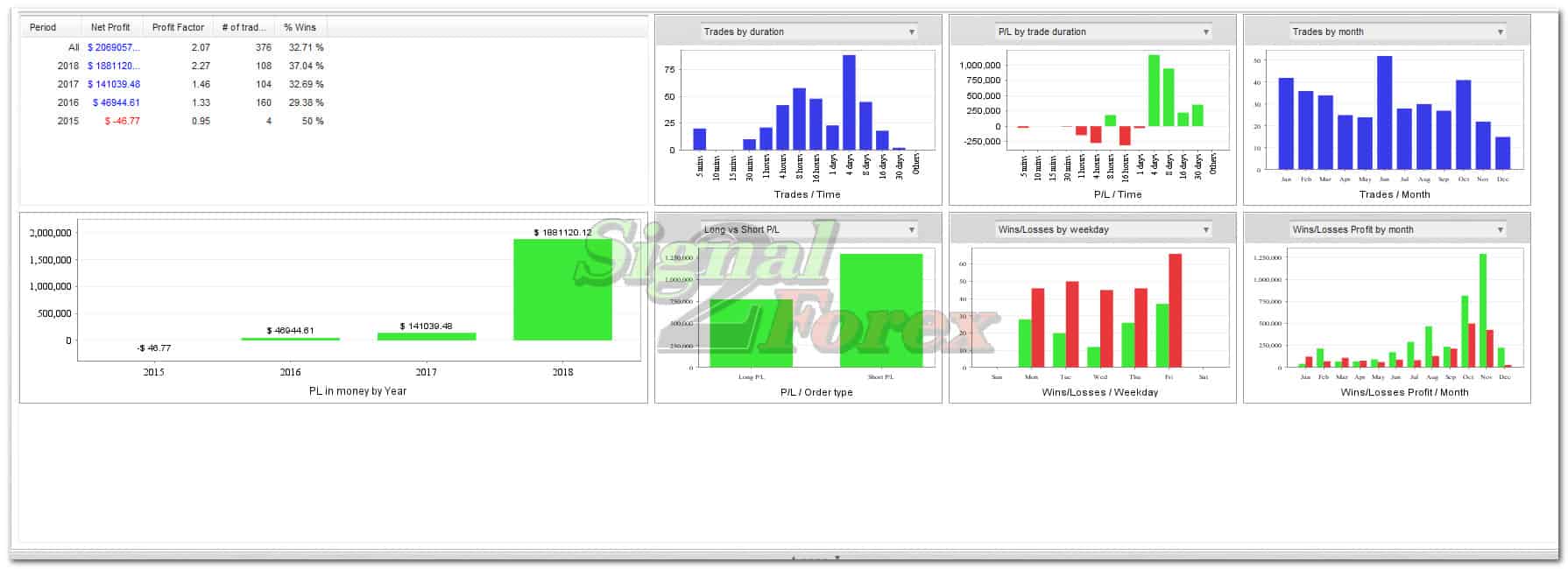
Designed for middle‑term trading, this EA automatically identifies trends, executes trades, and manages risk with integrated money management. With a backtested success rate of approximately 85% and monthly profit potential of 30-50%, it offers a compelling solution for traders seeking to automate their forex trading strategy. The robot operates 24/5 (Monday to Friday) on any broker that supports MT4, including standard, ECN, micro, cent, and PRO accounts.

2. How the Keltner Channel Strategy Works
The Keltner Channel EA uses a combination of channel breakouts and trend confirmation to identify trading opportunities. Here is how the strategy works:
What Is the Keltner Channel?
The Keltner Channel is a volatility-based indicator that creates a price envelope around a central moving average. The upper and lower bands are calculated by adding and subtracting a multiple of the Average True Range (ATR) from the central EMA. This creates a dynamic channel that expands and contracts with market volatility, providing traders with clear signals for entries and exits.
Trading Signals and Position Management
The EA identifies trading opportunities when price breaks through the upper or lower bands:
- Long Signal: When the price breaks above the upper band and the trend is bullish, the EA opens a buy position.
- Short Signal: When the price breaks below the lower band and the trend is bearish, the EA opens a sell position.
Each position is managed with an integrated money management system that includes automatic stop-loss and take-profit placement based on current volatility levels. The EA uses a maximum stop-loss of 153 pips and a maximum take-profit of 478 pips, ensuring a favourable risk-reward ratio.
Why M15 Timeframe and GBPUSD?
The M15 (15-minute) timeframe provides an optimal balance between signal frequency and reliability — frequent enough for active trading yet stable enough to filter out market noise. GBPUSD was chosen for its high liquidity, predictable volatility patterns, and tight spreads, making it ideal for the Keltner Channel strategy.
3. Technical Specifications
Below are the detailed technical specifications of the Keltner Channel Forex Robot, providing a clear overview of its capabilities and requirements.
| Specification | Detail |
|---|---|
| Platform | MetaTrader 4 (MT4) |
| Timeframe | M15 (15 minutes) |
| Currency Pair | GBPUSD |
| Trading Type | Middle-term |
| Money Management | Integrated |
| Maximum Spread | 4 (40) |
| Maximum Stop-Loss | 153 pips |
| Maximum Take-Profit | 478 pips |
| Broker Compatibility | Any (Standard, ECN, Micro, Cent, PRO) |
| Account Limits | None |
| Price | $49.00 |
📌 These specifications are based on the latest product version as of July 2026. Always check for updates before installation.
4. Advantages of the Keltner Channel EA
This Expert Advisor offers several distinct advantages that make it a valuable tool for both beginner and experienced traders.
| Advantage | Description |
|---|---|
| Fully Automated Trading | The EA executes trades 24/5 without manual intervention, eliminating emotional decision-making. |
| Proven Strategy | Based on the widely respected Keltner Channel indicator, a mainstay of technical analysis for decades. |
| Integrated Money Management | Built-in risk management system optimises the risk-reward ratio for each trade. |
| High Win Rate | Backtested success rate of approximately 85% with 30-50% monthly profit potential. |
| Simple Installation | Easy to install on MT4 with a step-by-step video guide included. |
| Free Trial Available | Test the EA before purchasing to ensure it meets your trading needs. |
📌 Past performance is not indicative of future results. Always use proper risk management when trading.
5. How to Get Started
Getting started with the Keltner Channel Forex Robot is straightforward. Follow these steps to begin automated trading on GBPUSD.
Installation on MT4
After purchase, you will receive the EA files (.ex4) and necessary indicator files. To install:
- Open your MetaTrader 4 platform.
- Go to File → Open Data Folder.
- Navigate to the MQL4 → Experts folder.
- Copy the .ex4 file into the Experts folder.
- Restart MetaTrader 4.
- The EA will appear in the Navigator panel under Expert Advisors.
A detailed video tutorial is available to guide you through the installation and configuration process.
Configuration and Settings
Once installed, drag the EA onto a GBPUSD M15 chart. The default settings are optimised for the M15 timeframe and GBPUSD. You can adjust parameters such as lot size, stop-loss, and take-profit according to your risk tolerance.
Money Management and Risk Management
The EA includes integrated money management features. For conservative trading, risk no more than 1-2% of your account balance per trade. The recommended minimum deposit is $100 for a standard account or $1 for a cent account.
6. Comparison with Other Forex Robots
How does the Keltner Channel EA stack up against other forex robots? The table below provides a clear comparison.
| Feature | Keltner Channel EA | Other Forex Robots |
|---|---|---|
| Strategy | Based on Keltner Channel | Varied (often unclear) |
| Timeframe | M15 (optimised) | Often M1/M5/H1 |
| Currency Pair | GBPUSD (optimised) | Varied |
| Money Management | Integrated | Not always included |
| Success Rate | 85% (backtested) | Varied |
| Price | $49.00 | $100–$500+ |
| Free Trial | Yes | Rarely |
📌 Prices and features are subject to change. Always verify current details before purchasing.

7. Frequently Asked Questions
What is the Keltner Channel forex robot?
The Keltner Channel forex robot is an Expert Advisor (EA) for MetaTrader 4 that automates trading based on the Keltner Channel indicator. It is designed for middle-term trading on GBPUSD with the M15 timeframe.
How does the EA work?
The EA uses the Keltner Channel indicator to identify trading signals. When price breaks above the upper band, it opens a buy position; when price breaks below the lower band, it opens a sell position. Positions are managed with integrated stop-loss and take-profit levels.
Which currency pairs does the robot trade?
The robot is optimised for GBPUSD but can be tested on other pairs. It is specifically designed for the M15 timeframe.
Which platform is required?
The robot requires MetaTrader 4 (MT4). It works with any broker that supports MT4 and any account type (standard, ECN, micro, cent, PRO).
What is the recommended minimum deposit?
The recommended minimum deposit is $100 for a standard account. For a cent account, you can start with as little as $1.
What is included in the purchase?
The purchase includes the EA file (.ex4), necessary indicator files, and access to an installation video guide.
Is a free trial available?
Yes, a free trial version is available for download before you commit to the purchase.
What is the success rate of the robot?
In backtesting, the robot has shown an 85% success rate with 30-50% monthly profit potential.
Does the robot trade 24/7?
Yes, the robot can trade 24 hours a day, 5 days a week (Monday to Friday) when installed on a VPS or a PC that remains on.
How do I install the EA on MT4?
After purchase, download the files, copy the .ex4 file into the “Experts” folder of your MT4 data directory, and restart the platform. A video tutorial is included to guide you through the process.
Video Tutorials
Watch these step-by-step video guides to install and configure your Keltner Channel EA, and to see it in action on a live chart.
🤖 Explore More Automated Trading Solutions: Browse our complete collection of forex trading robots and Expert Advisors — featuring a wide range of strategies including trend following, scalping, and portfolio trading. Whether you are looking for a complementary EA or a different approach, you will find a solution that fits your trading style.
📊 Stay Ahead with Market Insights: Enhance your trading decisions with our market overviews and analysis — covering major currency pairs, commodities, and indices. Understanding the broader market context can significantly improve your timing when using automated strategies like the Keltner Channel EA.
FAQ
📑 Table of Contents
1. What Is the Keltner Channel Forex Robot?
The Keltner Channel Forex Robot is an Expert Advisor (EA) for MetaTrader 4 (MT4) that automates trading based on the powerful Keltner Channel indicator. Developed by Chester W. Keltner in 1960, the Keltner Channel is a volatility-based indicator that consists of three lines: a central exponential moving average (EMA), and upper and lower bands calculated using the Average True Range (ATR). This EA leverages these bands to generate high-probability trading signals on the GBPUSD currency pair using the M15 (15-minute) timeframe.
Designed for middle‑term trading, this EA automatically identifies trends, executes trades, and manages risk with integrated money management. With a backtested success rate of approximately 85% and monthly profit potential of 30-50%, it offers a compelling solution for traders seeking to automate their forex trading strategy. The robot operates 24/5 (Monday to Friday) on any broker that supports MT4, including standard, ECN, micro, cent, and PRO accounts.
2. How the Keltner Channel Strategy Works
The Keltner Channel EA uses a combination of channel breakouts and trend confirmation to identify trading opportunities. Here is how the strategy works:
What Is the Keltner Channel?
The Keltner Channel is a volatility-based indicator that creates a price envelope around a central moving average. The upper and lower bands are calculated by adding and subtracting a multiple of the Average True Range (ATR) from the central EMA. This creates a dynamic channel that expands and contracts with market volatility, providing traders with clear signals for entries and exits.
Trading Signals and Position Management
The EA identifies trading opportunities when price breaks through the upper or lower bands:
- Long Signal: When the price breaks above the upper band and the trend is bullish, the EA opens a buy position.
- Short Signal: When the price breaks below the lower band and the trend is bearish, the EA opens a sell position.
Each position is managed with an integrated money management system that includes automatic stop-loss and take-profit placement based on current volatility levels. The EA uses a maximum stop-loss of 153 pips and a maximum take-profit of 478 pips, ensuring a favourable risk-reward ratio.
Why M15 Timeframe and GBPUSD?
The M15 (15-minute) timeframe provides an optimal balance between signal frequency and reliability — frequent enough for active trading yet stable enough to filter out market noise. GBPUSD was chosen for its high liquidity, predictable volatility patterns, and tight spreads, making it ideal for the Keltner Channel strategy.
3. Technical Specifications
Below are the detailed technical specifications of the Keltner Channel Forex Robot, providing a clear overview of its capabilities and requirements.
| Specification | Detail |
|---|---|
| Platform | MetaTrader 4 (MT4) |
| Timeframe | M15 (15 minutes) |
| Currency Pair | GBPUSD |
| Trading Type | Middle-term |
| Money Management | Integrated |
| Maximum Spread | 4 (40) |
| Maximum Stop-Loss | 153 pips |
| Maximum Take-Profit | 478 pips |
| Broker Compatibility | Any (Standard, ECN, Micro, Cent, PRO) |
| Account Limits | None |
| Price | $49.00 |
📌 These specifications are based on the latest product version as of July 2026. Always check for updates before installation.
4. Advantages of the Keltner Channel EA
This Expert Advisor offers several distinct advantages that make it a valuable tool for both beginner and experienced traders.
| Advantage | Description |
|---|---|
| Fully Automated Trading | The EA executes trades 24/5 without manual intervention, eliminating emotional decision-making. |
| Proven Strategy | Based on the widely respected Keltner Channel indicator, a mainstay of technical analysis for decades. |
| Integrated Money Management | Built-in risk management system optimises the risk-reward ratio for each trade. |
| High Win Rate | Backtested success rate of approximately 85% with 30-50% monthly profit potential. |
| Simple Installation | Easy to install on MT4 with a step-by-step video guide included. |
| Free Trial Available | Test the EA before purchasing to ensure it meets your trading needs. |
📌 Past performance is not indicative of future results. Always use proper risk management when trading.
5. How to Get Started
Getting started with the Keltner Channel Forex Robot is straightforward. Follow these steps to begin automated trading on GBPUSD.
Installation on MT4
After purchase, you will receive the EA files (.ex4) and necessary indicator files. To install:
- Open your MetaTrader 4 platform.
- Go to File → Open Data Folder.
- Navigate to the MQL4 → Experts folder.
- Copy the .ex4 file into the Experts folder.
- Restart MetaTrader 4.
- The EA will appear in the Navigator panel under Expert Advisors.
A detailed video tutorial is available to guide you through the installation and configuration process.
Configuration and Settings
Once installed, drag the EA onto a GBPUSD M15 chart. The default settings are optimised for the M15 timeframe and GBPUSD. You can adjust parameters such as lot size, stop-loss, and take-profit according to your risk tolerance.
Money Management and Risk Management
The EA includes integrated money management features. For conservative trading, risk no more than 1-2% of your account balance per trade. The recommended minimum deposit is $100 for a standard account or $1 for a cent account.
6. Comparison with Other Forex Robots
How does the Keltner Channel EA stack up against other forex robots? The table below provides a clear comparison.
| Feature | Keltner Channel EA | Other Forex Robots |
|---|---|---|
| Strategy | Based on Keltner Channel | Varied (often unclear) |
| Timeframe | M15 (optimised) | Often M1/M5/H1 |
| Currency Pair | GBPUSD (optimised) | Varied |
| Money Management | Integrated | Not always included |
| Success Rate | 85% (backtested) | Varied |
| Price | $49.00 | $100–$500+ |
| Free Trial | Yes | Rarely |
📌 Prices and features are subject to change. Always verify current details before purchasing.
7. Frequently Asked Questions
What is the Keltner Channel forex robot?
The Keltner Channel forex robot is an Expert Advisor (EA) for MetaTrader 4 that automates trading based on the Keltner Channel indicator. It is designed for middle-term trading on GBPUSD with the M15 timeframe.
How does the EA work?
The EA uses the Keltner Channel indicator to identify trading signals. When price breaks above the upper band, it opens a buy position; when price breaks below the lower band, it opens a sell position. Positions are managed with integrated stop-loss and take-profit levels.
Which currency pairs does the robot trade?
The robot is optimised for GBPUSD but can be tested on other pairs. It is specifically designed for the M15 timeframe.
Which platform is required?
The robot requires MetaTrader 4 (MT4). It works with any broker that supports MT4 and any account type (standard, ECN, micro, cent, PRO).
What is the recommended minimum deposit?
The recommended minimum deposit is $100 for a standard account. For a cent account, you can start with as little as $1.
What is included in the purchase?
The purchase includes the EA file (.ex4), necessary indicator files, and access to an installation video guide.
Is a free trial available?
Yes, a free trial version is available for download before you commit to the purchase.
What is the success rate of the robot?
In backtesting, the robot has shown an 85% success rate with 30-50% monthly profit potential.
Does the robot trade 24/7?
Yes, the robot can trade 24 hours a day, 5 days a week (Monday to Friday) when installed on a VPS or a PC that remains on.
How do I install the EA on MT4?
After purchase, download the files, copy the .ex4 file into the “Experts” folder of your MT4 data directory, and restart the platform. A video tutorial is included to guide you through the process.
Video Tutorials
Watch these step-by-step video guides to install and configure your Keltner Channel EA, and to see it in action on a live chart.
🤖 Explore More Automated Trading Solutions: Browse our complete collection of forex trading robots and Expert Advisors — featuring a wide range of strategies including trend following, scalping, and portfolio trading. Whether you are looking for a complementary EA or a different approach, you will find a solution that fits your trading style.
📊 Stay Ahead with Market Insights: Enhance your trading decisions with our market overviews and analysis — covering major currency pairs, commodities, and indices. Understanding the broader market context can significantly improve your timing when using automated strategies like the Keltner Channel EA.


 Signal2forex.com - Best Forex robots and signals


