
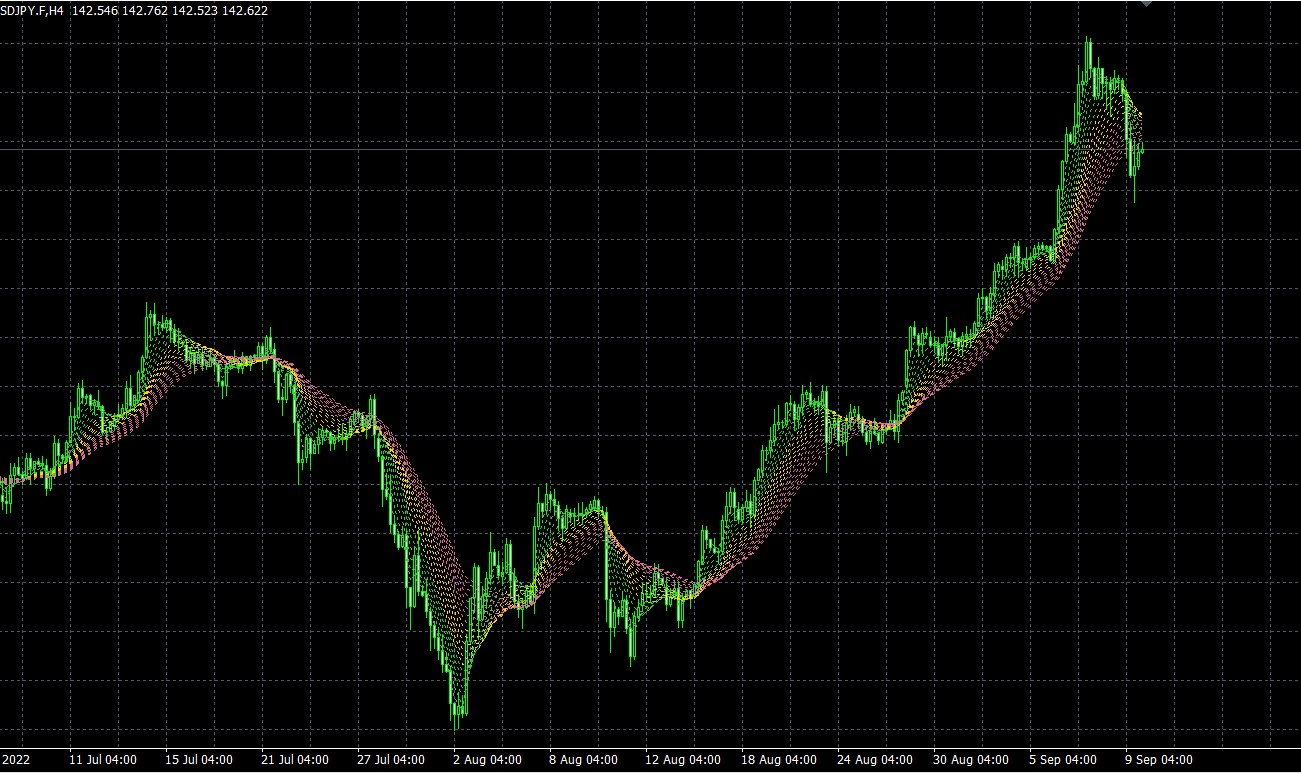
Taotra Trend Indicator – Free MT4/MT5
$0.00
System: Metatrader 4/5
Timeframe: any
Chart: any
How to download: Click Free download and checkout. Then enter your details and place order. You’ll receive download link automatically thereafter.
Description
📑 Table of Contents
- 1. What Is the Taotra Trend Indicator?
- 2. Key Features of Taotra Indicator
- 3. Taotra Indicator for MetaTrader 4 (MT4)
- 4. Taotra Indicator for MetaTrader 5 (MT5)
- 5. Technical Specifications
- 6. How to Install Taotra Indicator in MT4 & MT5
- 7. Taotra Indicator Settings and Configuration
- 8. Trading Strategy with Taotra Indicator
- 9. Taotra Indicator Review: Pros and Cons
- 10. Comparison Table: Taotra vs Other Trend Indicators
- 11. Frequently Asked Questions
1. What Is the Taotra Trend Indicator?
The Taotra Trend Indicator is a powerful free forex indicator designed for MetaTrader 4 and MetaTrader 5 that helps traders identify trend reversal points with remarkable accuracy. Created by the renowned developer Mladen, this indicator uses a moving average fan — a cluster of multiple moving averages that visually converge and diverge to signal potential turning points in the market.
Unlike traditional trend indicators that simply show direction, the Taotra Indicator focuses on reversal points — the exact moments when a trend is losing momentum and about to change direction. This makes it an invaluable tool for traders who want to enter at the beginning of a new trend rather than chasing breakouts or buying at the top.
The indicator works on any timeframe and any currency pair, making it versatile for scalpers, day traders, swing traders, and position traders alike. Its customizable settings allow you to fine-tune the number of moving averages, calculation methods, and visual display to match your trading style.
2. Key Features of Taotra Indicator
The Taotra Trend Indicator stands out from other reversal tools thanks to its unique combination of features:
- Moving Average Fan — displays a fan of multiple moving averages that visually converge at potential reversal points
- Customizable Number of MAs — you can choose how many moving averages to display (typically 3–5)
- Multiple Calculation Methods — supports SMA, EMA, WMA, and other moving average types
- Flexible Line Types — choose between solid, dashed, or dotted lines for each MA
- Two Display Modes — can be displayed as a chart overlay or in a separate basement window
- Works on Any Timeframe — from M1 to Monthly charts
- Works on Any Symbol — forex, commodities, indices, cryptocurrencies, and more
- Free to Use — completely free with no hidden fees or limitations
- Compatible with MT4 and MT5 — separate versions available for both platforms
3. Taotra Indicator for MetaTrader 4 (MT4)
The MT4 version of the Taotra Trend Indicator is fully compatible with MetaTrader 4, the world’s most popular trading platform. It integrates seamlessly into the MT4 environment and can be used alongside any other indicators or expert advisors.
Key benefits of the MT4 version:
- Runs on all MT4 builds (including the latest versions)
- Supports all MT4 timeframes (M1 to MN1)
- Can be combined with other MT4 indicators for confirmation
- Lightweight and fast — does not slow down your platform
- Easy to install — copy to the MQL4/Indicators folder
4. Taotra Indicator for MetaTrader 5 (MT5)
The MT5 version of the Taotra Trend Indicator is optimised for MetaTrader 5, the next-generation trading platform. It takes full advantage of MT5’s advanced features while maintaining the same core functionality and accuracy as the MT4 version.
Key benefits of the MT5 version:
- Optimised for MT5’s multi-threaded architecture
- Supports all MT5 timeframes and symbols
- Works with MT5’s advanced charting and analysis tools
- Compatible with MT5’s automated trading features
- Installation is simple — copy to the MQL5/Indicators folder
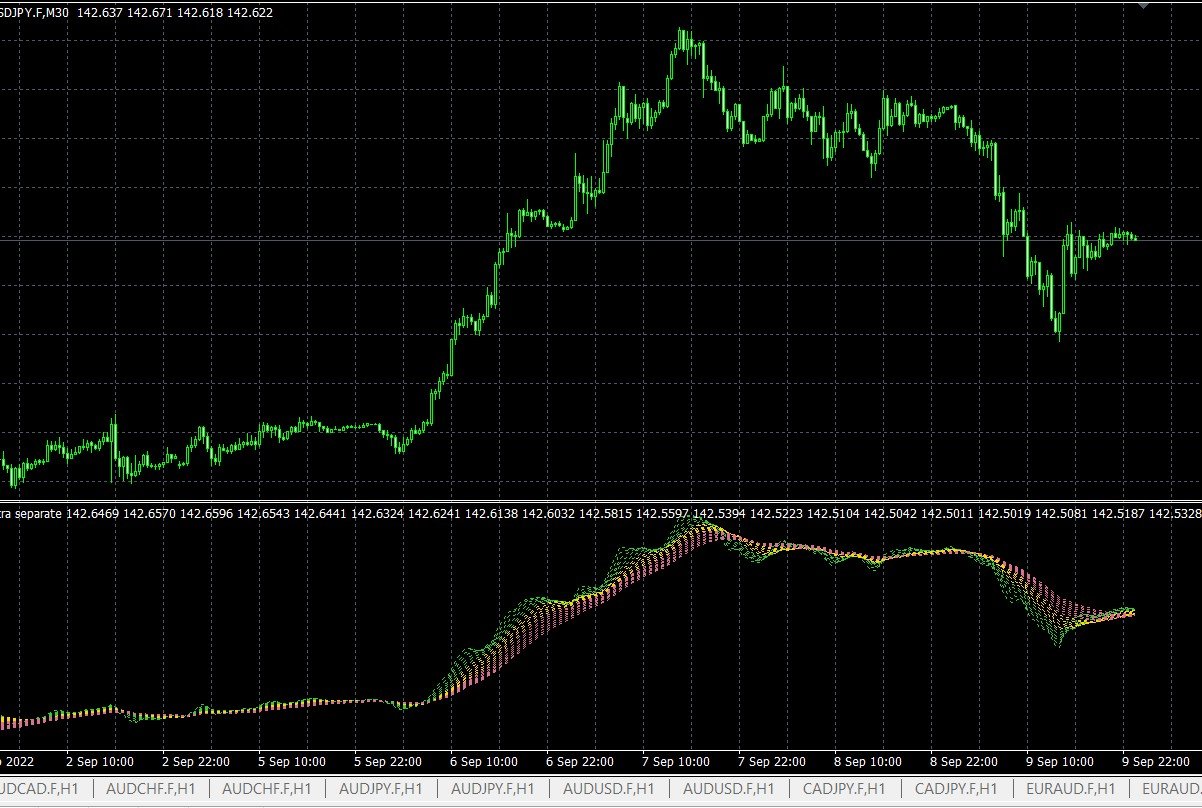
5. Technical Specifications
Below is a complete breakdown of the Taotra Trend Indicator’s technical specifications.
| Specification | Details |
|---|---|
| Indicator Name | Taotra Trend Indicator |
| Author | Mladen |
| Platform | MetaTrader 4 (MT4) & MetaTrader 5 (MT5) |
| Type | Trend Reversal Indicator |
| Timeframe | Any (M1 to MN1) |
| Currency Pairs | Any |
| Chart Type | Any |
| Moving Averages | Variable number (customizable) |
| Calculation Methods | Multiple (SMA, EMA, WMA, etc.) |
| Line Types | Multiple (solid, dashed, dotted) |
| Display Modes | Chart overlay & Basement |
| License | Free |
| Price | $0.00 |
📌 All settings can be customised in the indicator’s input parameters to match your trading style and preferences.
6. How to Install Taotra Indicator in MT4 & MT5
Installing the Taotra Trend Indicator is quick and straightforward. Follow the steps below for your specific platform.
Installation for MetaTrader 4 (MT4)
- Download the indicator file (
Taotra.ex4) from this page. - Open your MetaTrader 4 platform.
- Go to
File → Open Data Folder. - Navigate to
MQL4 → Indicators. - Copy the
Taotra.ex4file into the Indicators folder. - Restart MetaTrader 4.
- Drag the indicator from the Navigator panel onto your chart.
Installation for MetaTrader 5 (MT5)
- Download the indicator file (
Taotra.ex5) from this page. - Open your MetaTrader 5 platform.
- Go to
File → Open Data Folder. - Navigate to
MQL5 → Indicators. - Copy the
Taotra.ex5file into the Indicators folder. - Restart MetaTrader 5.
- Drag the indicator from the Navigator panel onto your chart.
7. Taotra Indicator Settings and Configuration
The Taotra Trend Indicator offers a wide range of customizable parameters. Below are the recommended settings for optimal performance.
| Parameter | Recommended Value | Description |
|---|---|---|
| Number of MAs | 3–5 | Number of moving averages in the fan |
| MA Method | SMA or EMA | Calculation method for moving averages |
| MA Periods | 5, 13, 21, 34, 55 | Fibonacci-based periods for optimal reversal detection |
| Line Type | Solid or Dashed | Visual representation of each MA |
| Display Mode | Chart Overlay | Better visual integration with price action |
| Timeframe | H1 or H4 | Optimal for trend reversal detection |
📌 These settings are a starting point. Feel free to experiment with different values to find what works best for your trading style.
8. Trading Strategy with Taotra Indicator
The Taotra Trend Indicator is most effective when used as part of a complete trading strategy. Here is a simple yet powerful approach that combines the indicator with price action confirmation.
Entry Rules
- Buy Signal: When the moving average fan narrows and then begins to fan out to the upside, and price closes above the fan.
- Sell Signal: When the moving average fan narrows and then begins to fan out to the downside, and price closes below the fan.
- Confirmation: Wait for a bullish or bearish candlestick pattern (e.g., pin bar, engulfing, or inside bar) to confirm the reversal.
Exit Rules
- Take Profit: Set your take profit at the next major support or resistance level, or use a risk-reward ratio of at least 1:2.
- Stop Loss: Place your stop loss just below the recent swing low (for buys) or above the recent swing high (for sells).
- Trailing Stop: Consider using a trailing stop to lock in profits as the trend develops.
Risk Management
- Risk no more than 1–2% of your account balance per trade.
- Use a positive risk-reward ratio (minimum 1:2).
- Avoid trading during high-impact news events that can cause erratic price movements.
9. Taotra Indicator Review: Pros and Cons
Every trading tool has its strengths and weaknesses. Here is an honest assessment of the Taotra Trend Indicator based on user feedback and real-world performance.
✅ Pros:
- Highly accurate reversal signals — the moving average fan provides clear visual cues
- Completely free — no hidden costs or limitations
- Works on MT4 and MT5 — compatible with both platforms
- Fully customizable — adjust the number of MAs, calculation methods, and display modes
- Works on any timeframe and symbol — versatile for all trading styles
- Created by a trusted developer — Mladen is a well-known name in the trading community
- Easy to install and use — straightforward setup process
❌ Cons:
- Requires practice to interpret — the fan can be overwhelming for beginners
- Not a standalone system — works best with price action confirmation
- Can generate false signals — especially in choppy or ranging markets
- No built-in alerts — you need to monitor the chart manually
10. Comparison Table: Taotra vs Other Trend Indicators
How does the Taotra Trend Indicator compare to other popular trend reversal tools? This table highlights the key differences.
| Feature | Taotra Indicator | Parabolic SAR | MACD | RSI |
|---|---|---|---|---|
| Platform | MT4 & MT5 | MT4 & MT5 | MT4 & MT5 | MT4 & MT5 |
| Type | Trend Reversal | Trend Reversal | Momentum | Oscillator |
| Moving Average Fan | ✅ Yes | ❌ No | ❌ No | ❌ No |
| Customizable MAs | ✅ Yes | ❌ No | ❌ No | ❌ No |
| Multiple Calculation Methods | ✅ Yes | ❌ No | ❌ No | ❌ No |
| Chart Display | Overlay & Basement | Overlay | Basement | Basement |
| Reversal Accuracy | High | Medium | Medium | Low |
| Free | ✅ Yes | ✅ Yes | ✅ Yes | ✅ Yes |
📌 Performance may vary depending on market conditions and individual trading styles.
11. Frequently Asked Questions
What is the Taotra Trend Indicator?
The Taotra Trend Indicator is a free forex indicator for MT4 and MT5 that identifies trend reversal points using a moving average fan. It was created by Mladen and is known for its customizable settings and high accuracy.
Is Taotra Indicator available for MT5?
Yes, the Taotra Indicator is available for both MetaTrader 4 (MT4) and MetaTrader 5 (MT5). You can download the appropriate version from this page.
How does the Taotra Indicator work?
The indicator builds a fan from multiple moving averages. When the fan narrows, it signals a potential trend reversal. Traders can customize the number of MAs, calculation methods, and line types.
What are the best settings for Taotra Indicator?
Recommended settings include 3–5 moving averages with periods of 5, 13, 21, 34, and 55 (Fibonacci-based). The SMA or EMA method works best, and H1 or H4 timeframes are optimal.
Is the Taotra Indicator free?
Yes, the Taotra Trend Indicator is completely free to download and use. There are no hidden fees or limitations.
Who created the Taotra Indicator?
The Taotra Indicator was created by Mladen, a well-known figure in the trading community known for developing high-quality technical indicators.
What currency pairs work with Taotra Indicator?
The Taotra Indicator works with any currency pair and any timeframe. It is versatile and can be applied to forex, commodities, indices, and more.
How do I install the Taotra Indicator?
Download the indicator file, copy it to the Indicators folder in your MetaTrader directory (MQL4/Indicators for MT4 or MQL5/Indicators for MT5), and restart the platform. Then drag the indicator onto your chart.
📈 Master the art of trend trading: Learn the fundamentals of trend trading strategies — including how to identify trends, choose the right timeframes, and use moving averages effectively. This comprehensive guide complements the Taotra Indicator perfectly.
🎯 Trade new trends with confidence: Discover how to use price action to trade new trends — a five-step process for identifying fresh trends and entering at the right moment. Combine this with the Taotra Indicator for even better results.


 Signal2forex.com - Best Forex robots and signals


