
Moving Average – Free Download for MT4 & MT5
$0.00
System: Metatrader 4/5
Timeframe: any
Chart: any
How to download: Click Free download and checkout. Then enter your details and place order. You’ll receive download link automatically thereafter.
Description
📑 Table of Contents
- 1. What Is the Moving Average Indicator?
- 2. Key Features of Moving Average Indicator
- 3. Moving Average Indicator for MetaTrader 4 (MT4)
- 4. Moving Average Indicator for MetaTrader 5 (MT5)
- 5. Technical Specifications
- 6. Types of Moving Averages
- 7. Moving Average Settings and Configuration
- 8. How to Use Moving Average Indicator
- 9. Moving Average Trading Strategies
- 10. How to Install Moving Average Indicator in MT4 & MT5
- 11. Moving Average Indicator Review: Pros and Cons
- 12. Comparison Table: SMA vs EMA vs WMA vs SMMA
- 13. Frequently Asked Questions
1. What Is the Moving Average Indicator?
The Moving Average (MA) is one of the most widely used technical indicators in forex and financial trading. It smooths out price data by calculating the average price over a specific number of periods, helping traders identify the direction of the trend and filter out market noise. By removing short‑term fluctuations, moving averages provide a clearer picture of the underlying trend.
The Moving Average indicator has been a cornerstone of technical analysis for decades, championed by pioneers like Richard Donchian and J.M. Hurst. It remains the foundation of countless trading strategies, from simple trend identification to complex multi‑timeframe systems. Whether you are a beginner learning the basics or an experienced trader refining your approach, the Moving Average is an essential tool in your trading toolkit.
In MetaTrader 4 and MetaTrader 5, the Moving Average indicator is available as a built‑in tool, making it instantly accessible on any chart. This page provides a comprehensive guide to using the Moving Average indicator effectively — from understanding the different types to implementing advanced trading strategies.

2. Key Features of Moving Average Indicator
The Moving Average indicator offers a range of features that make it one of the most versatile tools in technical analysis:
- Trend Identification — Clearly shows the direction and strength of the current trend
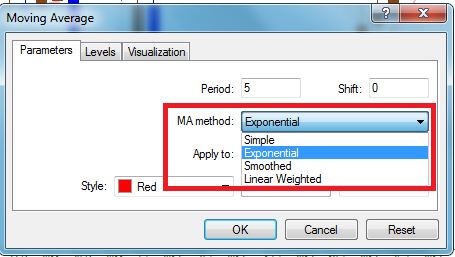
- Multiple Types — Choose from Simple (SMA), Exponential (EMA), Smoothed (SMMA), and Weighted (WMA) moving averages
- Customisable Period — Adjust the number of periods to suit any timeframe and trading style
- Dynamic Support & Resistance — Acts as adaptive support and resistance levels in trending markets
- Crossover Signals — MA crossovers provide clear entry and exit signals
- Noise Filtering — Smooths out market noise to reveal the underlying trend
- Works on Any Timeframe — From M1 to Monthly charts
- Works on Any Symbol — Forex, commodities, indices, and more
- Compatible with MT4 and MT5 — Built‑in and available on both platforms
- Completely Free — No hidden fees, no limitations
The Moving Average indicator is not just a single tool — it is a family of indicators that can be adapted to virtually any trading strategy.
3. Moving Average Indicator for MetaTrader 4 (MT4)
The MT4 version of the Moving Average indicator is built directly into MetaTrader 4, the world’s most popular trading platform. It is available in the Navigator panel under “Indicators → Trend” and can be applied to any chart with a single click.
Key benefits of the MT4 version:
- Instantly available — no installation required
- Runs on all MT4 builds (including the latest versions)
- Supports all MT4 timeframes (M1 to MN1)
- Can be combined with other MT4 indicators for confirmation
- Fully customisable — adjust period, MA type, and price source
4. Moving Average Indicator for MetaTrader 5 (MT5)
The MT5 version of the Moving Average indicator is built into MetaTrader 5, the next‑generation trading platform. It takes full advantage of MT5’s advanced features while maintaining the same core functionality and accuracy as the MT4 version.
Key benefits of the MT5 version:
- Instantly available — no installation required
- Optimised for MT5’s multi‑threaded architecture
- Supports all MT5 timeframes and symbols
- Works with MT5’s advanced charting and analysis tools
- Compatible with MT5’s automated trading features
5. Technical Specifications
Below is a complete breakdown of the Moving Average indicator’s technical specifications.
| Specification | Details |
|---|---|
| Indicator Name | Moving Average (MA) |
| Type | Trend Following Indicator |
| Platform | MetaTrader 4 (MT4) & MetaTrader 5 (MT5) |
| Calculation | Average of price over N periods |
| Main Types | SMA, EMA, SMMA, WMA |
| Key Parameters | Period, Apply to (price type) |
| Timeframe | Any (M1 to MN1) |
| Currency Pairs | Any |
| Chart Type | Any |
| License | Free |
| Price | $0.00 |
📌 The Moving Average indicator is built into both MT4 and MT5 — no separate download or installation is required to use it.
6. Types of Moving Averages
There are several types of moving averages, each with its own characteristics and best‑use cases. Understanding the differences is essential for choosing the right MA for your trading strategy.
Simple Moving Average (SMA)
The Simple Moving Average (SMA) calculates the average price over a specified number of periods, giving equal weight to each price point. This makes the SMA smoother and slower to react to price changes, which is useful for identifying long‑term trends without being distracted by short‑term volatility. The SMA is best for long‑term trend identification and is commonly used with periods of 50, 100, and 200.
Exponential Moving Average (EMA)
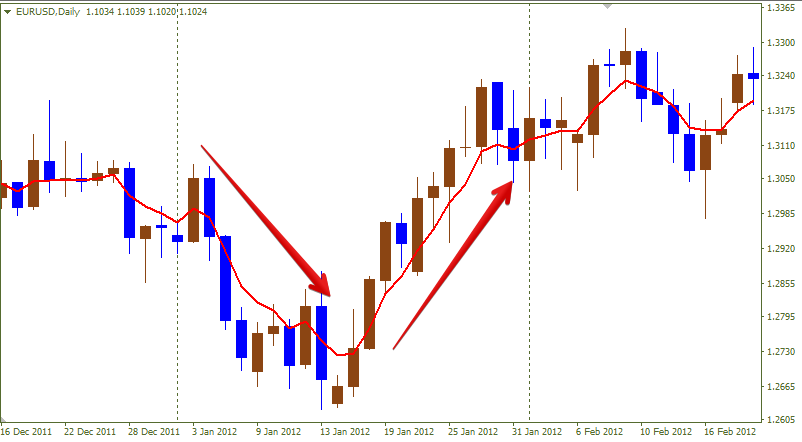
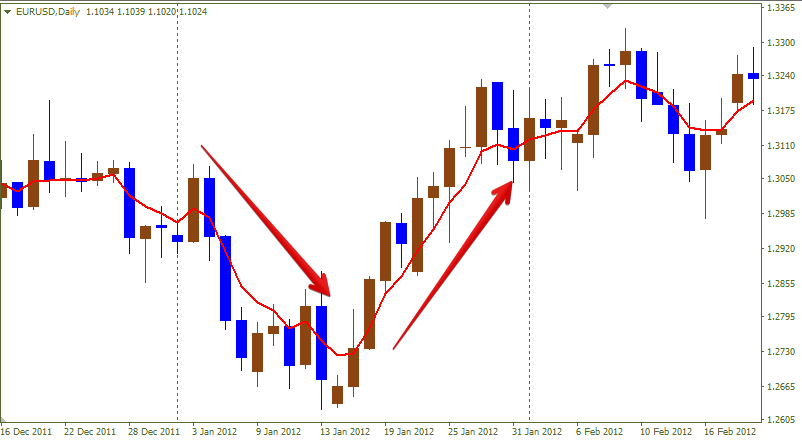
The Exponential Moving Average (EMA) gives more weight to recent prices, making it more responsive to new information. During a sharp price decline, the EMA turns down before the SMA does; during a sharp recovery, it turns up first. This makes the EMA better suited for short‑term trading and momentum strategies. Common periods for EMA include 9, 12, 20, and 50.
Weighted Moving Average (WMA)
The Weighted Moving Average (WMA) assigns a linearly decreasing weight to older prices, with the most recent price receiving the highest weight. This makes the WMA even more responsive than the EMA, though it is less commonly used in forex trading.
Smoothed Moving Average (SMMA)
The Smoothed Moving Average (SMMA) is a variation that applies additional smoothing to the average, making it less responsive to short‑term fluctuations than the EMA but more stable than the SMA. It is useful for traders who want a balance between responsiveness and smoothness.
7. Moving Average Settings and Configuration
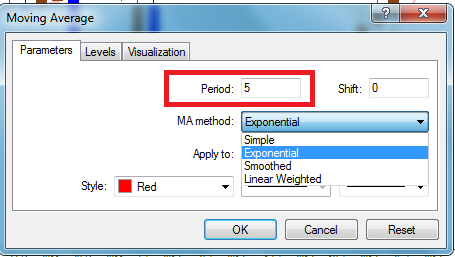
The Moving Average indicator offers two main parameters that you can adjust to suit your trading style: Period and Apply to.
Period
The Period setting determines how many price bars are used in the calculation. A shorter period makes the MA more responsive to recent price changes but more prone to false signals. A longer period makes the MA smoother and less responsive, which is better for identifying long‑term trends.
Apply to (Price Source)
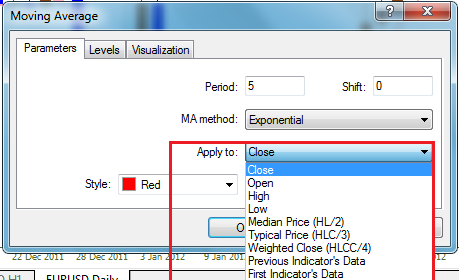
The Apply to setting determines which price data is used for the calculation. Options include:
- Close — uses the closing price of each bar (most common)
- Open — uses the opening price
- High — uses the highest price
- Low — uses the lowest price
- Median — (High + Low) / 2
- Typical — (High + Low + Close) / 3
- Weighted — (High + Low + 2 × Close) / 4
The most commonly used price source is Close, as it reflects the final price at which the bar closed.
8. How to Use Moving Average Indicator
The Moving Average indicator can be used in several ways to improve your trading decisions. Here are the most common applications.
Trend Direction Signal
The most basic use of a moving average is to determine the trend direction. When price is above a rising moving average, the trend is considered bullish. When price is below a falling moving average, the trend is considered bearish. The 200‑period moving average is widely used as a long‑term trend filter — staying above 200 MA suggests a bullish regime; falling below it suggests a bearish one.
Crossover Signals
Moving average crossovers are among the most popular trading signals. There are two main types:
- Golden Cross: When the 50‑period MA crosses above the 200‑period MA, signalling a potential long‑term bull market
- Death Cross: When the 50‑period MA crosses below the 200‑period MA, signalling a potential long‑term bear market
Support and Resistance
In strong trends, moving averages often act as dynamic support (in an uptrend) or dynamic resistance (in a downtrend). Price frequently pulls back to the moving average before resuming the trend, providing traders with high‑probability entry opportunities. Longer‑period MAs like the 100, 144, and 200 are particularly reliable as support and resistance levels.
Multi‑Timeframe Analysis
Using moving averages on multiple timeframes can provide powerful confirmation signals. When the MA on a higher timeframe agrees with the MA on a lower timeframe, the probability of a successful trade is significantly higher.
9. Moving Average Trading Strategies
Moving averages form the foundation of many powerful trading strategies. Here are some of the most effective approaches.
Golden Cross and Death Cross
The Golden Cross occurs when the 50‑period moving average crosses above the 200‑period moving average, signalling a potential long‑term bull market. The Death Cross occurs when the 50‑period MA crosses below the 200‑period MA, signalling a potential long‑term bear market. These are among the most widely followed signals in financial markets.
Moving Average Ribbon
A Moving Average Ribbon consists of multiple MA lines with different periods plotted on the same chart. It provides a visual representation of trend strength and momentum. When the ribbon is fanning out, it indicates a strong trend. When the ribbon is contracting, it indicates a loss of momentum and a potential trend change.
MA with Price Action Confirmation
To avoid false signals, combine moving averages with price action confirmation. For example, wait for price to close above a moving average and confirm with a bullish candlestick pattern before entering a buy trade. This approach reduces whipsaw in choppy markets.
Trailing Stop with Moving Averages
Moving averages can be used as a trailing stop to protect profits in a strong trend. In a bullish trend, use the rising 50‑period or 200‑period moving average as a trailing stop. As long as price remains above the MA, stay in the trade. If price closes below the MA, exit. In a bearish trend, do the opposite.

10. How to Install Moving Average Indicator in MT4 & MT5
The Moving Average indicator is built into both MetaTrader 4 and MetaTrader 5, so no separate installation is required. However, if you need to reinstall or add custom moving averages, follow the steps below.
Using Moving Average in MetaTrader 4 (MT4)
- Open your MetaTrader 4 platform.
- In the Navigator panel, expand
Indicators → Trend. - Drag the “Moving Average” indicator onto your chart.
- Configure the settings (period, MA type, apply to, style) and click OK.
Using Moving Average in MetaTrader 5 (MT5)
- Open your MetaTrader 5 platform.
- In the Navigator panel, expand
Indicators → Trend. - Drag the “Moving Average” indicator onto your chart.
- Configure the settings (period, MA type, apply to, style) and click OK.
For custom MA indicators: If you have a custom moving average file (.ex4 or .ex5), copy it to the Indicators folder (MQL4/Indicators for MT4 or MQL5/Indicators for MT5), restart the platform, and drag it from the Custom Indicators section of the Navigator.

11. Moving Average Indicator Review: Pros and Cons
Like any trading tool, moving averages have strengths and weaknesses. Understanding both is essential for using them effectively.
✅ Pros:
- Easy to interpret — simple visual representation of trend
- Flexible — can adjust period to suit any timeframe
- Dynamic support/resistance — acts as trend filter
- Works across all markets — forex, stocks, commodities
- Large data set — 200 DMA considers 200 price points
- Built into MT4 and MT5 — no installation required
- Completely free — no hidden fees or limitations
❌ Cons:
- Lagging indicator — signals come after price moves
- Ineffective in ranging markets — generates false signals
- Delayed entry — price may have already moved significantly
- Whiplash in volatile markets — frequent crossover signals
- No predictive power — only confirms what already happened
The key to success with moving averages is not the indicator itself — it is how you use it in conjunction with other tools and proper risk management.
12. Comparison Table: SMA vs EMA vs WMA vs SMMA
How do the different types of moving averages compare? This table highlights the key differences.
| Feature | SMA | EMA | SMMA | WMA |
|---|---|---|---|---|
| Full Name | Simple Moving Average | Exponential Moving Average | Smoothed Moving Average | Linear Weighted Moving Average |
| Weighting | Equal weight on all prices | More weight on recent prices | Smoothed weighting | Linearly decreasing weight |
| Reactivity | Slower, smoother | Faster, more responsive | Medium | Fastest |
| Lag | More lag | Less lag | Medium | Least lag |
| Whipsaw | Less prone to false signals | More prone to false signals | Medium | Most prone |
| Best Use | Long‑term trend identification | Short‑term momentum trading | Balanced smoothing | Short‑term trading |
| Common Periods | 50, 100, 200 | 9, 12, 20, 50 | Varies | Varies |
📌 SMA is best for long‑term trend confirmation, while EMA is best for short‑term entry timing. Many traders use both: EMA for entry signals and SMA for trend confirmation.
13. Frequently Asked Questions
What is the Moving Average indicator?
The Moving Average (MA) is a trend-following indicator that smooths price data by calculating the average price over a specified number of periods. It helps identify trend direction, support/resistance levels, and potential entry/exit points.
Is Moving Average indicator available for MT5?
Yes, the Moving Average indicator is available for both MetaTrader 4 (MT4) and MetaTrader 5 (MT5). It is built directly into both platforms.
What is the difference between SMA and EMA?
SMA (Simple Moving Average) gives equal weight to all prices in the period. EMA (Exponential Moving Average) gives more weight to recent prices, making it more responsive to new information. EMA is better for short‑term trading; SMA is better for long‑term trends.
What are the best Moving Average settings?
Recommended settings depend on your trading style: short‑term trading uses periods 5‑21 (EMA), medium‑term uses 30‑62 (SMA or EMA), long‑term uses 100‑200 (SMA).
What is the Golden Cross?
The Golden Cross occurs when the 50‑period moving average crosses above the 200‑period moving average, signalling a potential long‑term bull market.
What is the Death Cross?
The Death Cross occurs when the 50‑period moving average crosses below the 200‑period moving average, signalling a potential long‑term bear market.
Can I use Moving Average as support and resistance?
Yes, moving averages with longer periods (100, 144, 200) often act as dynamic support and resistance levels. Price bouncing off these levels can provide trading opportunities.
What is the Moving Average Ribbon?
A Moving Average Ribbon consists of multiple MA lines with different periods plotted on the same chart. It provides a visual representation of trend strength and momentum.
What currency pairs work with Moving Average?
The Moving Average indicator works with any currency pair, commodity, or index. It is particularly effective on major forex pairs like EURUSD, GBPUSD, and USDJPY.
How do I install the Moving Average indicator?
The Moving Average indicator is built into MetaTrader 4 and MetaTrader 5. Simply drag it from the Navigator panel (Indicators → Trend) onto your chart. No separate installation is required.
📈 Master trend trading with moving averages: The Moving Average indicator is the foundation of countless trend‑following strategies. Dive deeper into trend trading with moving averages — a comprehensive guide covering SMA vs EMA, the 200 DMA trend filter, moving average ribbons, and how to stay in trades using MA‑based trailing stops.
🥇 See moving averages in action: Understanding how price respects moving average levels is key to using them effectively. Our analysis of how gold respects moving averages shows real‑world examples of price reacting to the 50‑hour, 100‑hour, and 200‑hour SMAs — demonstrating the dynamic support and resistance that moving averages provide.

 Signal2forex.com - Best Forex robots and signals


Reviews
There are no reviews yet.