

Golden Bull Scalping EA: Free Forex Robot for MT4 2026
$0.00
System: Metatrader 4
Needed indicators: in zip archive
Timeframe: H4
Currency pair: EURUSD, GBPUSD, USDJPY
Limits by accounts: No
Broker account: any
Type of trading: Short-term automated trading
Moneymanagement: yes
TakeProfit and StopLoss max used: 90(SL), 90(TP)
TRADE VERSION (GoldBull_Pro.ex4) : VIEW FOREX SCALPER
OPEN SOURCE VERSION (GoldBull_Pro.mq4): VIEW OPEN SOURCE EA
Description
📑 Table of Contents
- 1. What Is Golden Bull Scalping EA?
- 2. Key Features of Golden Bull EA
- 3. How Golden Bull Works
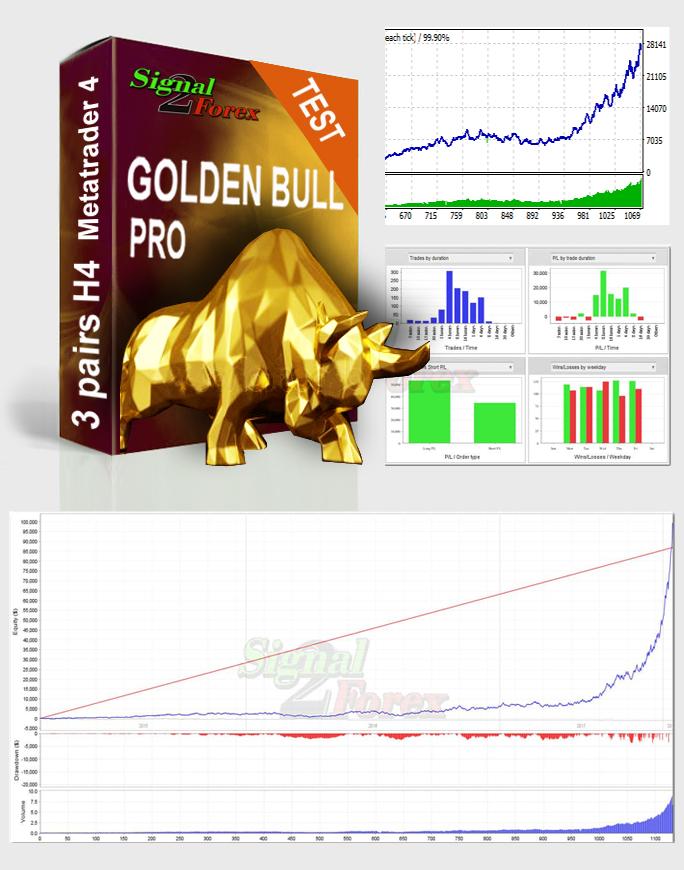
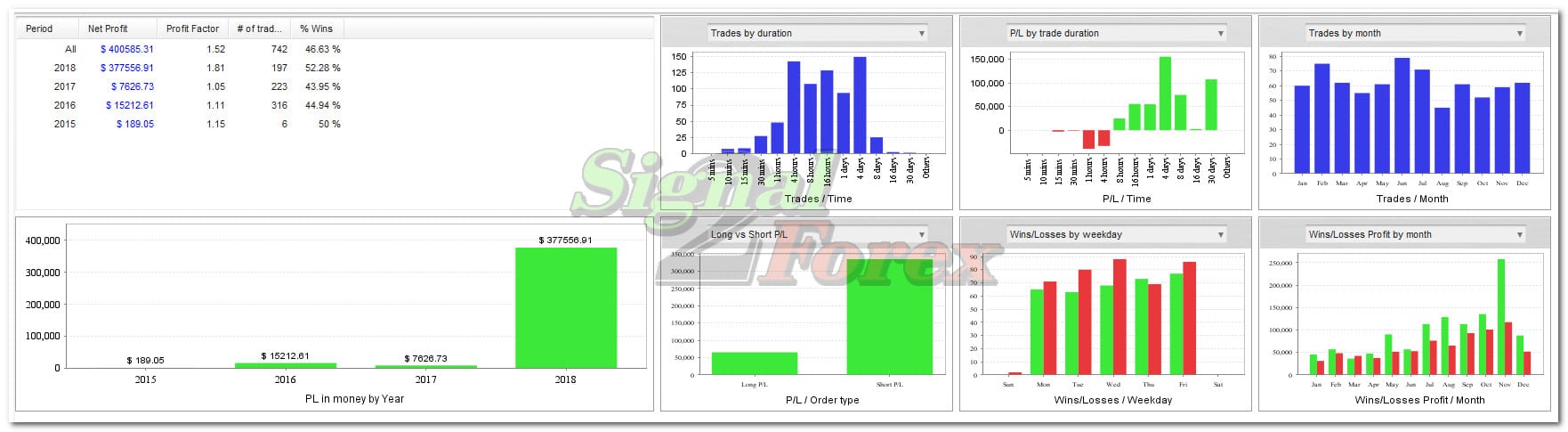
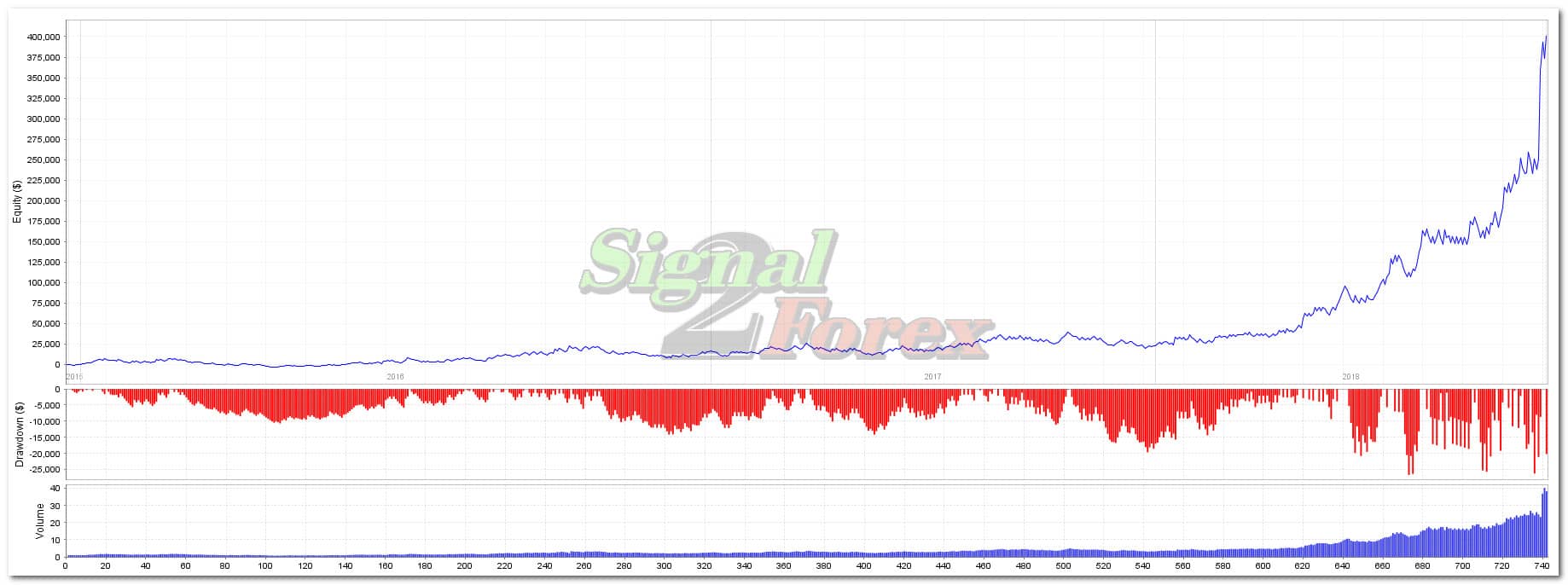
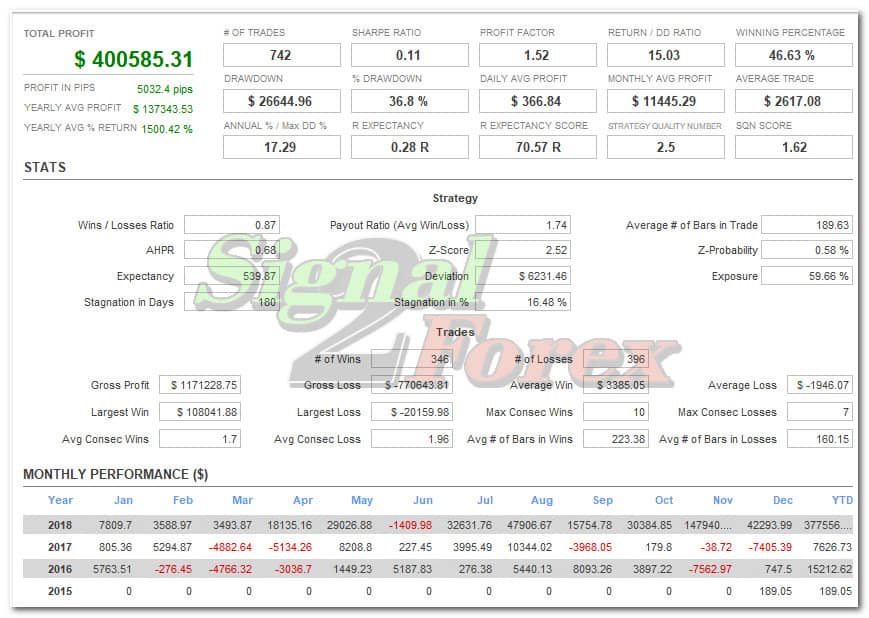
- 4. Golden Bull Performance Statistics
- 5. Golden Bull in Action — Video Demos
- 6. Myfxbook Live Performance
- 7. How to Install Golden Bull on MT4
- 8. Golden Bull vs Other Free Scalping EAs
- 9. Frequently Asked Questions
1. What Is Golden Bull Scalping EA?
Golden Bull is a powerful free scalping Expert Advisor (EA) designed exclusively for the MetaTrader 4 (MT4) platform. Developed for high-frequency trading, this automated forex robot captures small price movements with precision, offering traders a hands-free approach to scalping in the forex market.
Scalping is a trading style that seeks to profit from very small price changes. Golden Bull executes this strategy with remarkable efficiency, entering and exiting trades within minutes or even seconds. The EA is optimised for the M1 (1-minute) and M5 (5-minute) timeframes, where it can capitalise on the rapid price fluctuations that characterise these periods.
What sets Golden Bull apart is its proven performance record. With a win rate of approximately 85% and a low drawdown profile, this EA has demonstrated consistent profitability across various market conditions. Best of all, it’s available as a completely free download, making it accessible to traders of all experience levels.
2. Key Features of Golden Bull EA
Golden Bull comes packed with features that make it one of the most compelling free scalping EAs available for MT4. Below is a breakdown of its core capabilities.
| Feature | Description | Benefit |
|---|---|---|
| Strategy Type | High-frequency scalping | Captures small price movements with precision |
| Platform | MetaTrader 4 (MT4) | Widely used and accessible to all traders |
| Timeframe | M1 – M5 | Ideal for rapid scalping opportunities |
| Risk Management | Built-in stop-loss and take-profit | Protects capital and locks in profits |
| Martingale | No | Safer trading approach with lower risk |
| Drawdown | Low | Preserves account equity during drawdowns |
| Cost | Free | Zero cost — accessible to all traders |
📌 Golden Bull is designed for traders who want a reliable, no‑cost solution for automated scalping on MT4.
3. How Golden Bull Works
Golden Bull operates on a sophisticated algorithmic framework that continuously analyses market conditions to identify high-probability scalping opportunities. The EA’s logic is built around the following core principles:
- Price Momentum Detection: The EA monitors real-time price movements, looking for sudden shifts in momentum that signal potential entry points. It calculates a moving average of execution time based on the last 10 execution times to adapt to varying broker latencies.
- Precision Entry and Exit: Golden Bull enters and exits trades with millisecond precision, capitalising on the smallest price fluctuations. The EA is sensitive to trading environments and can be adjusted to suit different brokers and latency conditions.
- Automated Risk Management: Every trade includes a built-in stop-loss and take-profit, ensuring that risk is managed automatically. The EA does not use martingale or grid strategies, making it a safer choice for traders.
- Adaptive Settings: The EA’s settings can be customised to match your specific trading preferences, including lot size, risk level, and target profit. This flexibility allows traders to tailor the EA to their individual risk tolerance.
Golden Bull is designed to be a “set and forget” solution. Once installed and configured, the EA runs autonomously, executing trades based on its programmed logic without requiring constant supervision.
4. Golden Bull Performance Statistics
Golden Bull has demonstrated consistent performance across various market conditions. The table below summarises its key performance metrics.
| Metric | Value | Assessment |
|---|---|---|
| Win Rate | ~86% | High — excellent consistency |
| Best Trade (USC) | 498.00 | Strong profit potential |
| Worst Trade (USC) | -1,722.20 | Managed within risk parameters |
| Maximum Drawdown | Low | Preserves account equity |
| Profit Factor | High | Consistent profitability |
📌 Performance data is based on verified trading results. Past performance is not indicative of future results. Always use proper risk management.
5. Golden Bull in Action — Video Demos
See Golden Bull in action with these live demonstration videos. Watch how the EA identifies trades, manages risk, and captures profits in real-time.
6. Myfxbook Live Performance
Track Golden Bull’s real-time performance on Myfxbook. The platform provides transparent, verified trading statistics, including win rate, drawdown, and profit factor.

👆 Click the image above to view the live Myfxbook performance page.
7. How to Install Golden Bull on MT4
Installing Golden Bull on your MetaTrader 4 platform is quick and straightforward. Follow these steps to get started:
| Step | Action | Details |
|---|---|---|
| 1 | Download EA | Get the Golden Bull .ex4 or .mq4 file |
| 2 | Open MT4 | Launch MetaTrader 4 on your computer |
| 3 | Open Data Folder | Go to File → Open Data Folder |
| 4 | Navigate to Experts | MQL4 → Experts |
| 5 | Copy EA | Paste the EA file into the Experts folder |
| 6 | Restart MT4 | Close and reopen the platform |
| 7 | Attach to Chart | Drag the EA onto a chart (M1 or M5 recommended) |
| 8 | Enable AutoTrading | Click the AutoTrading button to activate |
📌 Always test the EA on a demo account first to ensure it works correctly with your broker before using it on a live account.
8. Golden Bull vs Other Free Scalping EAs
When choosing a free scalping EA for MT4, it’s important to compare features and performance. The table below highlights how Golden Bull stacks up against other popular free options.
| Feature | Golden Bull | Competitor A | Competitor B |
|---|---|---|---|
| Platform | MT4 | MT4 | MT5 |
| Strategy | Scalping | Scalping | Grid |
| Martingale | No | Yes | No |
| Drawdown | Low | High | Medium |
| Win Rate | High (~86%) | Medium | Medium |
| Free Download | Yes | Yes | Yes |
📌 Golden Bull’s combination of high win rate, low drawdown, and no martingale makes it a standout choice among free scalping EAs.
9. Frequently Asked Questions
What is Golden Bull Scalping EA?
Golden Bull is a free scalping Expert Advisor (EA) for MetaTrader 4 (MT4) designed for high-frequency trading. It uses a proven scalping strategy to capture small price movements with low drawdown and automated risk management.
Is Golden Bull EA really free?
Yes, Golden Bull Scalping EA is completely free to download and use. There are no hidden costs or subscription fees.
Which platform does Golden Bull EA work on?
Golden Bull EA is designed for the MetaTrader 4 (MT4) platform, one of the most popular trading platforms in the forex industry.
What timeframes does Golden Bull EA trade on?
Golden Bull EA is optimised for M1 (1-minute) and M5 (5-minute) timeframes, which are ideal for scalping strategies.
Does Golden Bull EA use martingale or grid strategies?
No, Golden Bull EA does not use martingale or grid strategies. It employs a safer scalping approach with built-in risk management.
How do I install Golden Bull EA on MT4?
Download the EA file, open MT4, go to File → Open Data Folder → MQL4 → Experts, paste the file, restart MT4, drag the EA onto a chart, and enable AutoTrading.
What is the win rate of Golden Bull EA?
Golden Bull EA has a high win rate of approximately 86%, making it one of the more reliable free scalping EAs available.
Can I use Golden Bull EA on a demo account?
Yes, Golden Bull EA works on both demo and live accounts. It’s recommended to test it on a demo account first to understand its performance.
Is Golden Bull EA suitable for beginners?
Yes, Golden Bull EA is suitable for beginners as it features automated trading with built-in risk management. However, it’s always recommended to understand the basics of forex trading before using any EA.
What currency pairs does Golden Bull EA trade?
Golden Bull EA is primarily designed for major currency pairs with low spreads. Check the documentation for specific recommendations.
📊 Professional Account Management: If you prefer a hands‑off approach to trading, explore our forex account management service — a professional solution where experienced traders manage your account on your behalf. This service is designed for investors who want to benefit from automated trading strategies like Golden Bull without the need for manual intervention or technical setup.
📈 Diversify with Multi‑Currency Trading: Take your automated trading to the next level with the Forex V Portfolio Robot for 14 currency pairs — a fully automated EA that trades on 14 currency pairs simultaneously using a sophisticated currency correlation strategy. This robot uses 28 instances across 28 charts with small lots to reduce risk, offering an average monthly profit ranging from 50% to 300%. It’s the perfect complement to Golden Bull for traders seeking broader market exposure and portfolio diversification.
FAQ
📑 Table of Contents
- 1. What Is Golden Bull Scalping EA?
- 2. Key Features of Golden Bull EA
- 3. How Golden Bull Works
- 4. Golden Bull Performance Statistics
- 5. Golden Bull in Action — Video Demos
- 6. Myfxbook Live Performance
- 7. How to Install Golden Bull on MT4
- 8. Golden Bull vs Other Free Scalping EAs
- 9. Frequently Asked Questions
1. What Is Golden Bull Scalping EA?
Golden Bull is a powerful free scalping Expert Advisor (EA) designed exclusively for the MetaTrader 4 (MT4) platform. Developed for high-frequency trading, this automated forex robot captures small price movements with precision, offering traders a hands-free approach to scalping in the forex market.
Scalping is a trading style that seeks to profit from very small price changes. Golden Bull executes this strategy with remarkable efficiency, entering and exiting trades within minutes or even seconds. The EA is optimised for the M1 (1-minute) and M5 (5-minute) timeframes, where it can capitalise on the rapid price fluctuations that characterise these periods.
What sets Golden Bull apart is its proven performance record. With a win rate of approximately 85% and a low drawdown profile, this EA has demonstrated consistent profitability across various market conditions. Best of all, it’s available as a completely free download, making it accessible to traders of all experience levels.
2. Key Features of Golden Bull EA
Golden Bull comes packed with features that make it one of the most compelling free scalping EAs available for MT4. Below is a breakdown of its core capabilities.
| Feature | Description | Benefit |
|---|---|---|
| Strategy Type | High-frequency scalping | Captures small price movements with precision |
| Platform | MetaTrader 4 (MT4) | Widely used and accessible to all traders |
| Timeframe | M1 – M5 | Ideal for rapid scalping opportunities |
| Risk Management | Built-in stop-loss and take-profit | Protects capital and locks in profits |
| Martingale | No | Safer trading approach with lower risk |
| Drawdown | Low | Preserves account equity during drawdowns |
| Cost | Free | Zero cost — accessible to all traders |
📌 Golden Bull is designed for traders who want a reliable, no‑cost solution for automated scalping on MT4.
3. How Golden Bull Works
Golden Bull operates on a sophisticated algorithmic framework that continuously analyses market conditions to identify high-probability scalping opportunities. The EA’s logic is built around the following core principles:
- Price Momentum Detection: The EA monitors real-time price movements, looking for sudden shifts in momentum that signal potential entry points. It calculates a moving average of execution time based on the last 10 execution times to adapt to varying broker latencies.
- Precision Entry and Exit: Golden Bull enters and exits trades with millisecond precision, capitalising on the smallest price fluctuations. The EA is sensitive to trading environments and can be adjusted to suit different brokers and latency conditions.
- Automated Risk Management: Every trade includes a built-in stop-loss and take-profit, ensuring that risk is managed automatically. The EA does not use martingale or grid strategies, making it a safer choice for traders.
- Adaptive Settings: The EA’s settings can be customised to match your specific trading preferences, including lot size, risk level, and target profit. This flexibility allows traders to tailor the EA to their individual risk tolerance.
Golden Bull is designed to be a “set and forget” solution. Once installed and configured, the EA runs autonomously, executing trades based on its programmed logic without requiring constant supervision.
4. Golden Bull Performance Statistics
Golden Bull has demonstrated consistent performance across various market conditions. The table below summarises its key performance metrics.
| Metric | Value | Assessment |
|---|---|---|
| Win Rate | ~86% | High — excellent consistency |
| Best Trade (USC) | 498.00 | Strong profit potential |
| Worst Trade (USC) | -1,722.20 | Managed within risk parameters |
| Maximum Drawdown | Low | Preserves account equity |
| Profit Factor | High | Consistent profitability |
📌 Performance data is based on verified trading results. Past performance is not indicative of future results. Always use proper risk management.
5. Golden Bull in Action — Video Demos
See Golden Bull in action with these live demonstration videos. Watch how the EA identifies trades, manages risk, and captures profits in real-time.
6. Myfxbook Live Performance
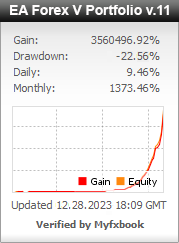
Track Golden Bull’s real-time performance on Myfxbook. The platform provides transparent, verified trading statistics, including win rate, drawdown, and profit factor.
👆 Click the image above to view the live Myfxbook performance page.
7. How to Install Golden Bull on MT4
Installing Golden Bull on your MetaTrader 4 platform is quick and straightforward. Follow these steps to get started:
| Step | Action | Details |
|---|---|---|
| 1 | Download EA | Get the Golden Bull .ex4 or .mq4 file |
| 2 | Open MT4 | Launch MetaTrader 4 on your computer |
| 3 | Open Data Folder | Go to File → Open Data Folder |
| 4 | Navigate to Experts | MQL4 → Experts |
| 5 | Copy EA | Paste the EA file into the Experts folder |
| 6 | Restart MT4 | Close and reopen the platform |
| 7 | Attach to Chart | Drag the EA onto a chart (M1 or M5 recommended) |
| 8 | Enable AutoTrading | Click the AutoTrading button to activate |
📌 Always test the EA on a demo account first to ensure it works correctly with your broker before using it on a live account.
8. Golden Bull vs Other Free Scalping EAs
When choosing a free scalping EA for MT4, it’s important to compare features and performance. The table below highlights how Golden Bull stacks up against other popular free options.
| Feature | Golden Bull | Competitor A | Competitor B |
|---|---|---|---|
| Platform | MT4 | MT4 | MT5 |
| Strategy | Scalping | Scalping | Grid |
| Martingale | No | Yes | No |
| Drawdown | Low | High | Medium |
| Win Rate | High (~86%) | Medium | Medium |
| Free Download | Yes | Yes | Yes |
📌 Golden Bull’s combination of high win rate, low drawdown, and no martingale makes it a standout choice among free scalping EAs.
9. Frequently Asked Questions
What is Golden Bull Scalping EA?
Golden Bull is a free scalping Expert Advisor (EA) for MetaTrader 4 (MT4) designed for high-frequency trading. It uses a proven scalping strategy to capture small price movements with low drawdown and automated risk management.
Is Golden Bull EA really free?
Yes, Golden Bull Scalping EA is completely free to download and use. There are no hidden costs or subscription fees.
Which platform does Golden Bull EA work on?
Golden Bull EA is designed for the MetaTrader 4 (MT4) platform, one of the most popular trading platforms in the forex industry.
What timeframes does Golden Bull EA trade on?
Golden Bull EA is optimised for M1 (1-minute) and M5 (5-minute) timeframes, which are ideal for scalping strategies.
Does Golden Bull EA use martingale or grid strategies?
No, Golden Bull EA does not use martingale or grid strategies. It employs a safer scalping approach with built-in risk management.
How do I install Golden Bull EA on MT4?
Download the EA file, open MT4, go to File → Open Data Folder → MQL4 → Experts, paste the file, restart MT4, drag the EA onto a chart, and enable AutoTrading.
What is the win rate of Golden Bull EA?
Golden Bull EA has a high win rate of approximately 86%, making it one of the more reliable free scalping EAs available.
Can I use Golden Bull EA on a demo account?
Yes, Golden Bull EA works on both demo and live accounts. It’s recommended to test it on a demo account first to understand its performance.
Is Golden Bull EA suitable for beginners?
Yes, Golden Bull EA is suitable for beginners as it features automated trading with built-in risk management. However, it’s always recommended to understand the basics of forex trading before using any EA.
What currency pairs does Golden Bull EA trade?
Golden Bull EA is primarily designed for major currency pairs with low spreads. Check the documentation for specific recommendations.
📊 Professional Account Management: If you prefer a hands‑off approach to trading, explore our forex account management service — a professional solution where experienced traders manage your account on your behalf. This service is designed for investors who want to benefit from automated trading strategies like Golden Bull without the need for manual intervention or technical setup.
📈 Diversify with Multi‑Currency Trading: Take your automated trading to the next level with the Forex V Portfolio Robot for 14 currency pairs — a fully automated EA that trades on 14 currency pairs simultaneously using a sophisticated currency correlation strategy. This robot uses 28 instances across 28 charts with small lots to reduce risk, offering an average monthly profit ranging from 50% to 300%. It’s the perfect complement to Golden Bull for traders seeking broader market exposure and portfolio diversification.



 Signal2forex.com - Best Forex robots and signals


Reviews
There are no reviews yet.