
Keltner Channels Indicator – Free Download for MT4/MT5
$0.00
System: Metatrader 4/5
Timeframe: any
Chart: any
How to download: Click Buy now and checkout. Then enter your details and place order. You’ll receive download link thereafter automatically.
Description
📑 Table of Contents
- 1. What Is the Keltner Channels F1 Indicator?
- 2. Key Features of Keltner Channels Indicator
- 3. Keltner Channels Indicator for MetaTrader 4 (MT4)
- 4. Keltner Channels Indicator for MetaTrader 5 (MT5)
- 5. Technical Specifications
- 6. Understanding Keltner Channels
- 7. How to Use Keltner Channels F1 Indicator
- 8. How to Install Keltner Channels Indicator in MT4 & MT5
- 9. Keltner Channels Indicator Settings and Configuration
- 10. Keltner Channels Indicator Review: Pros and Cons
- 11. Comparison Table: Keltner Channels vs Bollinger Bands
- 12. Frequently Asked Questions
1. What Is the Keltner Channels F1 Indicator?
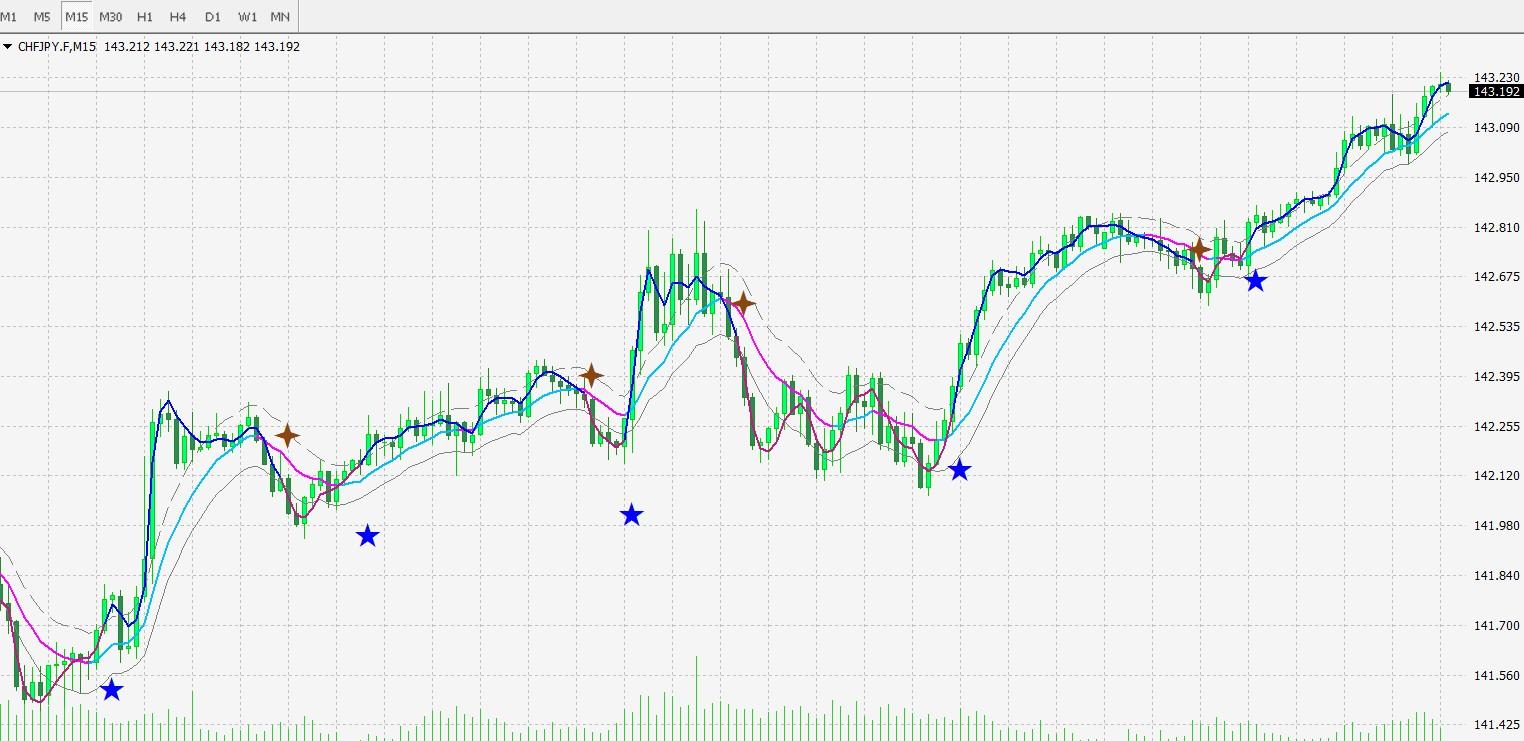
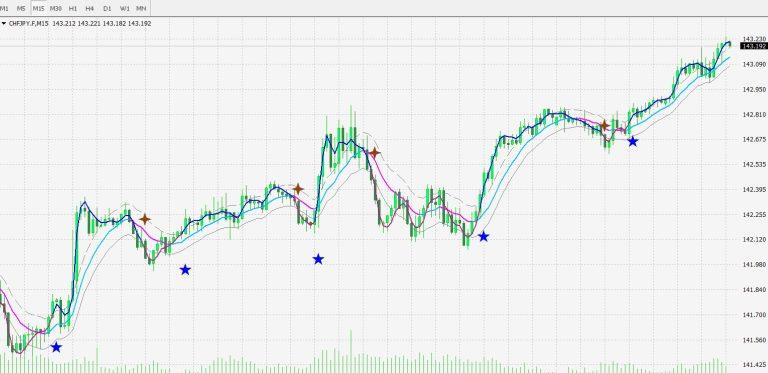
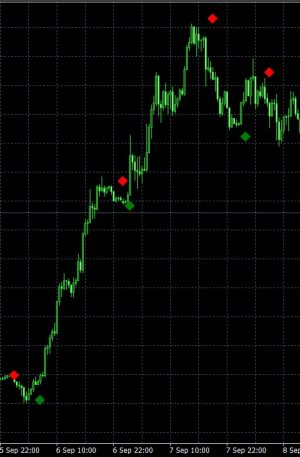
The Keltner Channels F1 indicator is a free signal modification of the popular Keltner Channels indicator designed for MetaTrader 4 and MetaTrader 5. It provides clear forex trading signals in the form of colored stars directly on your chart, making it easy to identify optimal entry points for buy and sell trades.
Keltner Channels were developed by Chester Keltner in the 1960s and have since become one of the most widely used volatility-based indicators in technical analysis. The channels are constructed using three lines:
- A middle line — an Exponential Moving Average (EMA) that shows the current trend direction
- An upper band — the EMA plus a multiple of the Average True Range (ATR)
- A lower band — the EMA minus a multiple of the ATR
The F1 version enhances the traditional Keltner Channels by adding star-shaped entry signals and multi-frame mode — a powerful feature that allows traders to view Keltner Channels readings from multiple timeframes simultaneously. This helps confirm signals and provides a broader perspective on market conditions.
Whether you are a scalper, day trader, or swing trader, the Keltner Channels F1 indicator adapts to any trading style and any timeframe, making it a versatile addition to your trading toolkit.
2. Key Features of Keltner Channels Indicator
The Keltner Channels F1 indicator is packed with features designed to give you an edge in volatility-based trading:
- Star Entry Signals — Clear colored stars on your chart indicating optimal buy and sell entry points
- Multi-Frame Mode — View Keltner Channels readings from multiple timeframes simultaneously
- Volatility-Based Analysis — Uses Average True Range (ATR) to adapt to market conditions
- EMA Trend Line — The middle line shows the current trend direction and strength
- Dynamic Upper & Lower Bands — Adaptive support and resistance levels based on market volatility
- Works on Any Timeframe — From M1 to Monthly charts
- Works on Any Symbol — Forex, commodities, indices, and more
- Compatible with MT4 and MT5 — Separate versions for both platforms
- Completely Free — No hidden fees, no limitations
3. Keltner Channels Indicator for MetaTrader 4 (MT4)
The MT4 version of the Keltner Channels F1 indicator is fully compatible with MetaTrader 4, the world’s most popular trading platform. It integrates seamlessly into the MT4 environment and can be used alongside any other indicators or expert advisors.
Key benefits of the MT4 version:
- Runs on all MT4 builds (including the latest versions)
- Supports all MT4 timeframes (M1 to MN1)
- Can be combined with other MT4 indicators for confirmation
- Lightweight and fast — does not slow down your platform
- Easy to install — copy to the MQL4/Indicators folder
4. Keltner Channels Indicator for MetaTrader 5 (MT5)
The MT5 version of the Keltner Channels F1 indicator is optimised for MetaTrader 5, the next-generation trading platform. It takes full advantage of MT5’s advanced features while maintaining the same core functionality and accuracy as the MT4 version.
Key benefits of the MT5 version:
- Optimised for MT5’s multi-threaded architecture
- Supports all MT5 timeframes and symbols
- Works with MT5’s advanced charting and analysis tools
- Compatible with MT5’s automated trading features
- Installation is simple — copy to the MQL5/Indicators folder
5. Technical Specifications
Below is a complete breakdown of the Keltner Channels F1 indicator’s technical specifications.
| Specification | Details |
|---|---|
| Indicator Name | Keltner Channels F1 |
| Type | Signal Modification of Keltner Channels |
| Platform | MetaTrader 4 (MT4) & MetaTrader 5 (MT5) |
| Base Indicator | Keltner Channels (EMA + ATR) |
| Signal Display | Colored stars for entry signals |
| Timeframe | Any (M1 to MN1) |
| Currency Pairs | Any |
| Chart Type | Any |
| Multi-Frame Mode | Yes |
| Volatility-Based | Yes (uses ATR) |
| License | Free |
| Price | $0.00 |
📌 All settings can be customised in the indicator’s input parameters to match your trading style and preferences.
6. Understanding Keltner Channels
To use the Keltner Channels F1 indicator effectively, it’s important to understand how the underlying Keltner Channels work. Here’s a breakdown of the key components.
How Keltner Channels Work
Keltner Channels are volatility-based envelopes that adapt to market conditions. The channels expand during high volatility and contract during low volatility, providing dynamic support and resistance levels that reflect the current market environment.
EMA (Exponential Moving Average) – The Middle Line
The middle line of the Keltner Channels is an Exponential Moving Average (EMA), typically calculated over 20 periods. The EMA gives more weight to recent price data, making it more responsive to new information than a Simple Moving Average (SMA). This middle line serves as the baseline for the channels and indicates the overall trend direction — upward for a bullish trend and downward for a bearish trend.
ATR (Average True Range) – The Outer Bands
The upper and lower bands of the Keltner Channels are calculated using the Average True Range (ATR), a measure of market volatility developed by J. Welles Wilder. The ATR provides a dynamic multiplier that expands and contracts with market volatility:
- Upper Band = EMA + (ATR × Multiplier)
- Lower Band = EMA − (ATR × Multiplier)
The standard multiplier is 2.0, which captures approximately 95% of price action in many markets.
Keltner Channels vs Bollinger Bands – Key Differences
While both Keltner Channels and Bollinger Bands are volatility-based envelope indicators, they differ in several important ways. Keltner Channels use ATR (which measures average range) and are therefore smoother and less sensitive to price spikes. Bollinger Bands use standard deviation (which measures statistical volatility) and are more sensitive to sudden price movements. Keltner Channels are generally better for trend following, while Bollinger Bands are often preferred for mean-reversion strategies.
7. How to Use Keltner Channels F1 Indicator
The Keltner Channels F1 indicator is designed to be intuitive and powerful. Here are the key guidelines for using it effectively.
Reading the Star Signals
- Buy Signal (Green Star): Appears when the price touches or moves above the upper channel, indicating a potential breakout or trend continuation to the upside.
- Sell Signal (Red Star): Appears when the price touches or moves below the lower channel, indicating a potential breakout or trend continuation to the downside.
- Confirmation: For stronger signals, look for stars that appear with the trend direction confirmed by the middle EMA line.
Multi-Frame Mode
The multi-frame mode is a powerful feature that allows you to view Keltner Channels readings from multiple timeframes simultaneously. This helps you:
- Confirm signals across different timeframes
- Identify the larger trend context for better decision-making
- Filter out false signals by checking alignment across timeframes
Entry and Exit Rules
- Entry: Open a trade when a star signal appears and the price is in the direction of the middle EMA line.
- Stop Loss: Place your stop loss just beyond the opposite channel band (below the lower band for buys, above the upper band for sells).
- Take Profit: Set your take profit at the opposite channel band or use a risk-reward ratio of at least 1:2.
- Exit: Close your position when the price touches the opposite channel band or when an opposite star signal appears.
Trading Strategies with Keltner Channels
- Breakout Strategy: Enter when the price closes above the upper band (buy) or below the lower band (sell), confirmed by star signals.
- Trend Following: Trade in the direction of the middle EMA line, using star signals as entry triggers.
- Mean Reversion: Enter when the price touches the upper band (sell) or lower band (buy) and shows signs of reversal.
8. How to Install Keltner Channels Indicator in MT4 & MT5
Installing the Keltner Channels F1 indicator is quick and straightforward. Follow the steps below for your specific platform.
Installation for MetaTrader 4 (MT4)
- Download the indicator file from this page.
- Open your MetaTrader 4 platform.
- Go to
File → Open Data Folder. - Navigate to
MQL4 → Indicators. - Copy the indicator file into the Indicators folder.
- Restart MetaTrader 4.
- Drag the indicator from the Navigator panel onto your chart.
Installation for MetaTrader 5 (MT5)
- Download the indicator file from this page.
- Open your MetaTrader 5 platform.
- Go to
File → Open Data Folder. - Navigate to
MQL5 → Indicators. - Copy the indicator file into the Indicators folder.
- Restart MetaTrader 5.
- Drag the indicator from the Navigator panel onto your chart.
9. Keltner Channels Indicator Settings and Configuration
The Keltner Channels F1 indicator offers a range of customizable parameters. Below are the recommended settings for optimal performance.
| Parameter | Recommended Value | Description |
|---|---|---|
| EMA Period | 20 | Period for the middle moving average line |
| ATR Period | 10 | Period for Average True Range calculation |
| ATR Multiplier | 2.0 | Multiplier for upper and lower bands |
| Price Type | Close or HL/2 | Price used for EMA calculation |
| Timeframe | Any | Works on all timeframes |
| Multi-Frame Mode | Enabled | Display readings from multiple timeframes |
📌 These settings are a starting point. Feel free to experiment with different values to find what works best for your trading style.
10. Keltner Channels Indicator Review: Pros and Cons
Here is an honest assessment of the Keltner Channels F1 indicator based on user feedback and real-world performance.
✅ Pros:
- Clear star signals — easy-to-read entry signals on your chart
- Multi-frame mode — provides a broader market perspective
- Volatility-based analysis — adapts to changing market conditions
- Simple to use — intuitive and beginner-friendly
- Works on MT4 and MT5 — compatible with both platforms
- Completely free — no hidden fees or limitations
- Versatile — works on any timeframe and currency pair
❌ Cons:
- Not a standalone system — works best with price action confirmation
- Best on higher timeframes — H1 and above recommended for optimal results
- Requires practice — like any tool, it takes time to master
- Multi-frame mode can be overwhelming for beginners
11. Comparison Table: Keltner Channels vs Bollinger Bands
How does the Keltner Channels F1 indicator compare to Bollinger Bands? This table highlights the key differences between these two popular volatility-based indicators.
| Feature | Keltner Channels | Bollinger Bands |
|---|---|---|
| Platform | MT4 & MT5 | MT4 & MT5 |
| Middle Line | EMA (Exponential Moving Average) | SMA (Simple Moving Average) |
| Outer Bands | ATR (Average True Range) | Standard Deviation |
| Volatility Measure | Average True Range | Standard Deviation |
| Band Width | Constant multiplier of ATR | Dynamic (standard deviation) |
| Sensitivity | Smoother, less sensitive to spikes | More sensitive to price spikes |
| Best Use | Trend following, breakout trading | Volatility measurement, mean reversion |
| Signal Type | Star signals (F1 modification) | Traditional price-band interaction |
| Free | ✅ Yes | ✅ Yes |
📌 Both indicators are valuable tools. Keltner Channels are generally preferred for trend-following strategies, while Bollinger Bands are often used for mean-reversion strategies.
12. Frequently Asked Questions
What is the Keltner Channels F1 indicator?
The Keltner Channels F1 indicator is a free signal modification of the popular Keltner Channels indicator for MT4 and MT5. It provides clear entry signals in the form of colored stars and features multi-frame mode for comprehensive market analysis.
Is Keltner Channels indicator available for MT5?
Yes, the Keltner Channels F1 indicator is available for both MetaTrader 4 (MT4) and MetaTrader 5 (MT5). You can download the appropriate version from this page.
How does the Keltner Channels indicator work?
The Keltner Channels indicator uses an Exponential Moving Average (EMA) as the middle line and Average True Range (ATR) to calculate the upper and lower bands. It creates volatility-based channels that help identify trends, breakouts, and potential reversal points.
What is the difference between Keltner Channels and Bollinger Bands?
Keltner Channels use ATR (Average True Range) to calculate the outer bands, while Bollinger Bands use standard deviation. Keltner Channels are smoother and less sensitive to price spikes, making them better for trend following. Bollinger Bands are more sensitive to volatility changes.
What do the star signals mean?
The Keltner Channels F1 indicator displays entry signals as colored stars on your chart. The color of the star indicates the direction of the signal — helping you identify optimal entry points for buy or sell trades.
What is multi-frame mode?
Multi-frame mode allows the Keltner Channels F1 indicator to display readings from multiple timeframes simultaneously. This helps traders get a broader view of market conditions and confirm signals across different timeframes.
What are the best settings for Keltner Channels?
Recommended settings include a 20-period EMA for the middle line, a 10-period ATR, and a multiplier of 2.0 for the outer bands. These settings work well for most currency pairs and timeframes.
Is the Keltner Channels indicator free?
Yes, the Keltner Channels F1 indicator is completely free to download and use. There are no hidden fees or limitations.
How do I install the Keltner Channels indicator?
Download the indicator file, copy it to the Indicators folder in your MetaTrader directory (MQL4/Indicators for MT4 or MQL5/Indicators for MT5), restart the platform, and drag the indicator onto your chart.
What currency pairs work with Keltner Channels?
The Keltner Channels indicator works with any currency pair, commodity, or index. It is particularly effective on major forex pairs like EURUSD, GBPUSD, and USDJPY, as well as on gold (XAUUSD).
📊 Master both channel indicators: While the Keltner Channels F1 is excellent for trend following, you can also benefit from understanding how to use Bollinger Bands in forex trading — a comprehensive guide covering Bollinger Band strategies, volatility trading, and how to combine both indicators for even better results.
🌏 Trade with market context: Understanding broader market conditions is essential when using any indicator. Learn how Asian Open market dynamics and Fed policy create volatility conditions that affect Keltner Channels — helping you interpret signals in the context of real market events.


 Signal2forex.com - Best Forex robots and signals


Reviews
There are no reviews yet.