
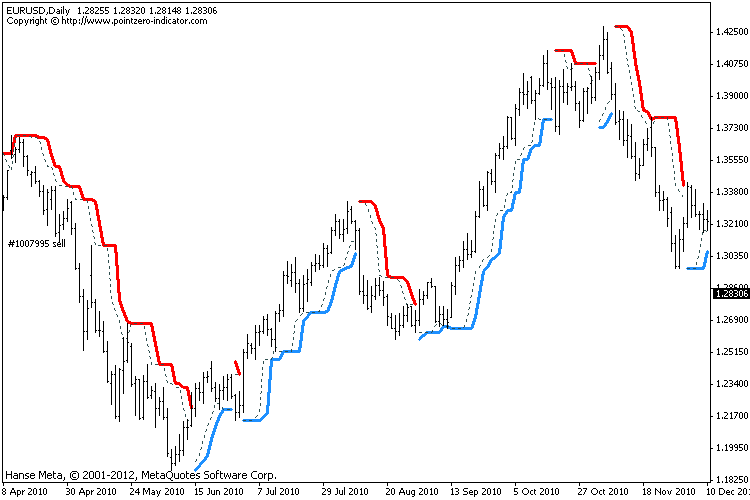
Turtle Trading Channel – Free MT4/MT5 Download
$0.00
System: – Metatrader 4/5
Timeframe: any
Chart: any
How to download: Click Free download and checkout. Then enter your details and place order. You’ll receive download link automatically thereafter.
Description
📑 Table of Contents
- 1. What Is the Turtle Trading Channel Indicator?
- 2. Key Features of Turtle Trading Channel Indicator
- 3. Turtle Trading Channel Indicator for MetaTrader 4 (MT4)
- 4. Turtle Trading Channel Indicator for MetaTrader 5 (MT5)
- 5. Technical Specifications
- 6. Understanding the Turtle Trading System
- 7. How to Use Turtle Trading Channel Indicator
- 8. How to Install Turtle Trading Channel Indicator in MT4 & MT5
- 9. Turtle Trading Channel Indicator Settings and Configuration
- 10. Turtle Trading Channel Indicator Review: Pros and Cons
- 11. Comparison Table: Turtle Trading Channel vs Donchian Channel
- 12. Frequently Asked Questions
1. What Is the Turtle Trading Channel Indicator?
The Turtle Trading Channel indicator is a free breakout indicator designed for MetaTrader 4 and MetaTrader 5 that implements the Donchian Channel — the cornerstone of the legendary Turtle Trading System. This indicator identifies potential entry points when price breaks above the highest high or below the lowest low of a defined period, following the exact rules that made the Turtle Traders famous in the 1980s.
Developed by Richard Dennis and William Eckhardt, the Turtle Trading System was one of the most successful trend-following experiments in financial history. Over a five-year period, the “Turtles” — a group of novice traders trained by Dennis — generated over $175 million in profits using a simple rules-based approach. The system’s core component was the Donchian Channel, a volatility-based indicator that plots the highest high and lowest low over a specified period.
The Turtle Trading Channel indicator brings this legendary strategy to your MetaTrader platform, providing clear breakout signals that are easy to identify and act upon. Whether you are a beginner or an experienced trader, this indicator helps you implement the proven Turtle Trading methodology with precision and consistency.
2. Key Features of Turtle Trading Channel Indicator
The Turtle Trading Channel indicator is packed with features that make breakout trading simple and effective:
- Donchian Channel Core — Based on the same volatility-based channel used by the legendary Turtle Traders
- Dual System (S1 & S2) — Implements both the short-term (S1) and long-term failsafe (S2) Turtle systems
- Clear Breakout Signals — Identifies when price breaks above or below the channel, generating BUY or SELL signals
- Customisable Periods — Adjust entry and exit periods to match your trading style
- Color-Coded Visualization — Easy-to-read channel lines and signal markers
- Works on Any Timeframe — From M1 to Monthly charts (H4 and Daily recommended)
- Works on Any Symbol — Forex, commodities, indices, and more
- Compatible with MT4 and MT5 — Available for both platforms
- Completely Free — No hidden fees, no limitations
3. Turtle Trading Channel Indicator for MetaTrader 4 (MT4)
The MT4 version of the Turtle Trading Channel indicator is fully compatible with MetaTrader 4, the world’s most popular trading platform. It integrates seamlessly into the MT4 environment and can be used alongside any other indicators or expert advisors.
Key benefits of the MT4 version:
- Runs on all MT4 builds (including the latest versions)
- Supports all MT4 timeframes (M1 to MN1)
- Can be combined with other MT4 indicators for confirmation
- Lightweight and fast — does not slow down your platform
- Easy to install — copy to the MQL4/Indicators folder
4. Turtle Trading Channel Indicator for MetaTrader 5 (MT5)
The MT5 version of the Turtle Trading Channel indicator is optimised for MetaTrader 5, the next-generation trading platform. It takes full advantage of MT5’s advanced features while maintaining the same core functionality and accuracy as the MT4 version.
Key benefits of the MT5 version:
- Optimised for MT5’s multi-threaded architecture
- Supports all MT5 timeframes and symbols
- Works with MT5’s advanced charting and analysis tools
- Compatible with MT5’s automated trading features
- Installation is simple — copy to the MQL5/Indicators folder
5. Technical Specifications
Below is a complete breakdown of the Turtle Trading Channel indicator’s technical specifications.
| Specification | Details |
|---|---|
| Indicator Name | Turtle Trading Channel |
| Type | Breakout / Trend Following Indicator |
| Platform | MetaTrader 4 (MT4) & MetaTrader 5 (MT5) |
| Base Indicator | Donchian Channel |
| Key Feature | Breakout signals based on highest high / lowest low |
| Entry Period (S1) | 20 bars |
| Exit Period (S1) | 10 bars |
| Entry Period (S2) | 55 bars |
| Exit Period (S2) | 20 bars |
| Timeframe | Any (recommended: H4, Daily) |
| Currency Pairs | Any |
| Chart Type | Any |
| License | Free |
| Price | $0.00 |
📌 The Turtle Trading Channel implements the exact Donchian Channel breakout rules used by the legendary Turtle Traders.
6. Understanding the Turtle Trading System
The Turtle Trading System is one of the most famous trend-following strategies in trading history. Developed in the early 1980s by legendary commodities trader Richard Dennis, the system was designed to prove that trading could be taught to anyone — not just innate geniuses.
Dennis recruited a group of novice traders (the “Turtles”) and trained them in a simple rules-based approach. Over the next five years, the Turtles generated over $175 million in profits, proving that a disciplined, systematic approach to trading could be highly successful.
The Donchian Channel
The core of the Turtle Trading System is the Donchian Channel, a volatility-based indicator developed by Richard Donchian. The channel consists of three lines:
- Upper Band: The highest high over a specified period
- Lower Band: The lowest low over a specified period
- Middle Line: The midpoint between the upper and lower bands
The S1 and S2 Systems
The Turtle Trading System actually consists of two separate systems:
- S1 (Short-Term): Uses a 20-period entry breakout and a 10-period exit. This system is designed to capture shorter-term trends.
- S2 (Long-Term/Failsafe): Uses a 55-period entry breakout and a 20-period exit. This system acts as a backup, providing signals if the trader gets stopped out of the S1 trade.
By using both systems, Turtle Traders could stay in trends longer and capture larger moves. The S2 system often produced the biggest profits, as it allowed traders to ride major trends without being shaken out by minor pullbacks.
7. How to Use Turtle Trading Channel Indicator
The Turtle Trading Channel indicator is designed to be simple and effective. Follow these guidelines to get the most out of this powerful breakout tool.
Reading the Signals
- BUY Signal: When price breaks above the upper channel line, a BUY signal is generated. Enter a long position.
- SELL Signal: When price breaks below the lower channel line, a SELL signal is generated. Enter a short position.
- Channel Width: A wide channel indicates high volatility; a narrow channel indicates low volatility and a potential breakout building.
- Color Changes: The indicator typically changes color or displays arrows to highlight breakout signals.
Entry and Exit Rules
- Entry (S1): Enter when price breaks above the 20-period high (BUY) or below the 20-period low (SELL).
- Exit (S1): Exit when price breaks below the 10-period low (for BUY) or above the 10-period high (for SELL).
- Entry (S2): Enter when price breaks above the 55-period high (BUY) or below the 55-period low (SELL).
- Exit (S2): Exit when price breaks below the 20-period low (for BUY) or above the 20-period high (for SELL).
- Stop Loss: Place your stop loss just beyond the opposite side of the channel.
- Position Sizing: Risk a fixed percentage of your account per trade (typically 1-2%).
Trading Strategies with Turtle Trading Channel
- Pure Breakout Strategy: Follow the S1 signals for entry and exit. This is the classic Turtle approach.
- Dual System Strategy: Use S1 for initial entries and S2 for re-entries if stopped out of the S1 trade.
- Multi-Timeframe Breakout: Use the Turtle Trading Channel on multiple timeframes. A breakout on the higher timeframe confirms the trend direction; use the lower timeframe for finer entry timing.
- Breakout with Filter: Add a trend filter (such as a 200-period SMA) to only take breakouts in the direction of the larger trend.
8. How to Install Turtle Trading Channel Indicator in MT4 & MT5
Installing the Turtle Trading Channel indicator is quick and straightforward. Follow the steps below for your specific platform.
Installation for MetaTrader 4 (MT4)
- Download the indicator file from this page for free.
- Open your MetaTrader 4 platform.
- Go to
File → Open Data Folder. - Navigate to
MQL4 → Indicators. - Copy the indicator file into the Indicators folder.
- Restart MetaTrader 4.
- Drag the indicator from the Navigator panel onto your chart.
Installation for MetaTrader 5 (MT5)
- Download the indicator file from this page for free.
- Open your MetaTrader 5 platform.
- Go to
File → Open Data Folder. - Navigate to
MQL5 → Indicators. - Copy the indicator file into the Indicators folder.
- Restart MetaTrader 5.
- Drag the indicator from the Navigator panel onto your chart.
9. Turtle Trading Channel Indicator Settings and Configuration
The Turtle Trading Channel indicator offers a range of customizable parameters. Below are the recommended settings for optimal performance.
| Parameter | Recommended Value | Description |
|---|---|---|
| Entry Period (S1) | 20 | Short-term breakout entry period |
| Exit Period (S1) | 10 | Short-term exit signal period |
| Entry Period (S2) | 55 | Long-term breakout entry period (failsafe) |
| Exit Period (S2) | 20 | Long-term exit signal period (failsafe) |
| Timeframe | H4 or Daily | Optimal for trend following |
| Currency Pairs | Major pairs | EURUSD, GBPUSD, USDJPY, AUDUSD |
📌 These settings are a starting point. Experiment with different periods to find what works best for your trading style and the instruments you trade.
10. Turtle Trading Channel Indicator Review: Pros and Cons
Here is an honest assessment of the Turtle Trading Channel indicator based on the legendary Turtle Trading System’s track record and real-world performance.
✅ Pros:
- Proven strategy — The Turtle Trading System generated over $175 million in profits
- Simple and mechanical — Clear rules, no subjectivity
- Captures major trends — Designed to catch large moves in trending markets
- Dual system (S1/S2) — Provides backup signals if stopped out of the first trade
- Works on MT4 and MT5 — compatible with both platforms
- Completely free — no hidden fees or limitations
- Versatile — works on any timeframe and any instrument
❌ Cons:
- Can have long losing streaks — Like all trend-following systems, it can experience extended periods of losses
- Requires patience and discipline — Must stick to the rules during drawdowns
- Not effective in ranging markets — Choppy, sideways markets can produce false breakouts
- Requires practice — like any tool, it takes time to master
11. Comparison Table: Turtle Trading Channel vs Donchian Channel
How does the Turtle Trading Channel indicator compare to the standard Donchian Channel? This table highlights the key differences.
| Feature | Turtle Trading Channel | Standard Donchian Channel |
|---|---|---|
| Platform | MT4 & MT5 | MT4 & MT5 |
| Breakout Signals | ✅ Yes | ❌ No |
| Dual System (S1/S2) | ✅ Yes | ❌ No |
| Entry/Exit Periods | ✅ Yes | ❌ No |
| Color-Coded Signals | ✅ Yes | ❌ No |
| Trend Following Focus | ✅ Yes | ✅ Yes |
| Free | ✅ Yes | ✅ Yes |
📌 The Turtle Trading Channel builds on the Donchian Channel by adding breakout signals, dual system functionality, and color-coded visualization.
12. Frequently Asked Questions
What is the Turtle Trading Channel indicator?
The Turtle Trading Channel indicator is a free breakout indicator for MT4 and MT5 based on the Donchian Channel. It identifies breakout entry points when price breaks above the highest high or below the lowest low of a defined period, following the classic Turtle Trading System rules.
Is Turtle Trading Channel available for MT5?
Yes, the Turtle Trading Channel indicator is available for both MetaTrader 4 (MT4) and MetaTrader 5 (MT5). You can download the appropriate version from this page for free.
What is the Turtle Trading System?
The Turtle Trading System was a famous trend-following strategy developed by Richard Dennis in the 1980s. It used Donchian Channel breakouts for entry and exit signals. The system produced legendary traders who generated hundreds of millions in profits.
What is the Donchian Channel?
The Donchian Channel is a volatility-based indicator that plots the highest high and lowest low over a specified period. It consists of an upper band (highest high), a lower band (lowest low), and a middle line. Breakouts above or below the channel signal potential trend changes.
What are the S1 and S2 systems in Turtle Trading?
The Turtle Trading System uses two systems: S1 (short-term) with 20-period entry and 10-period exit, and S2 (long-term/failsafe) with 55-period entry and 20-period exit. Using both systems provides backup signals if stopped out of the first trade.
How do I read the Turtle Trading Channel signals?
When price breaks above the upper channel line, a BUY signal is generated. When price breaks below the lower channel line, a SELL signal is generated. The indicator typically displays these signals with color changes or arrows on the chart.
What are the best settings for Turtle Trading Channel?
Recommended settings depend on your trading style. For short-term trading, use Entry Period 20 and Exit Period 10 (S1). For long-term trading, use Entry Period 55 and Exit Period 20 (S2). H4 or Daily timeframes are recommended for optimal results.
How do I install the Turtle Trading Channel indicator?
Download the indicator file, copy it to the Indicators folder in your MetaTrader directory (MQL4/Indicators for MT4 or MQL5/Indicators for MT5), restart the platform, and drag the indicator onto your chart.
What currency pairs work with Turtle Trading Channel?
The Turtle Trading Channel indicator works with any currency pair, commodity, or index. It is particularly effective on major forex pairs like EURUSD, GBPUSD, and USDJPY, as well as commodities like gold and oil.
Is Turtle Trading Channel free to use?
Yes, the Turtle Trading Channel indicator is completely free to download and use. There are no hidden fees or limitations.
📈 See breakout trading in action: The Turtle Trading Channel is designed to catch exactly the kind of moves analysed in our article on GBPJPY bulls hanging in there despite a minor pullback — where we examine how a strong two-week rally tested key resistance levels. The Donchian Channel breakout signals would have helped identify both the initial entry and the points where bullish momentum began to stall.
📊 Identify trend exhaustion with confidence: Knowing when a trend is losing steam is just as important as knowing when it’s starting. Our analysis of AUDUSD bears taking a breather after almost a 2-year low demonstrates how technical indicators can warn of weakening momentum — the kind of setup where the Turtle Trading Channel’s S2 failsafe system can help you stay in the trend longer or exit before a major reversal.

 Signal2forex.com - Best Forex robots and signals


Reviews
There are no reviews yet.