

Hull Moving Average Mountain Histogram-Free MT4/5
$0.00
System: – Metatrader 4/5
Timeframe: any
Chart: any
How to download: Click Free download and checkout. Then enter your details and place order. You’ll receive download link automatically thereafter.
Description
📑 Table of Contents
- 1. What Is the Hull Moving Average Mountain Histogram?
- 2. Key Features of Hull Moving Average Mountain Histogram
- 3. Hull Moving Average Mountain Histogram for MetaTrader 4 (MT4)
- 4. Hull Moving Average Mountain Histogram for MetaTrader 5 (MT5)
- 5. Technical Specifications
- 6. What Is the Hull Moving Average (HMA)?
- 7. Understanding the Mountain Histogram Display
- 8. How to Use Hull Moving Average Mountain Histogram
- 9. How to Install Hull Moving Average Mountain Histogram in MT4 & MT5
- 10. Hull Moving Average Mountain Histogram Settings and Configuration
- 11. Hull Moving Average Mountain Histogram Review: Pros and Cons
- 12. Comparison Table: Hull Moving Average Histogram vs Standard Moving Averages
- 13. Frequently Asked Questions
1. What Is the Hull Moving Average Mountain Histogram?
The Hull Moving Average Mountain Histogram is a powerful free trend-following indicator designed for MetaTrader 4 and MetaTrader 5 that combines the advanced Hull Moving Average (HMA) with a visual histogram display in the basement window. Developed to address the lag inherent in traditional moving averages, this indicator provides virtually zero-lag signals while presenting them in an intuitive, easy-to-read format.
The indicator is built on the Hull Moving Average, developed by Alan Hull in 2005, which uses a sophisticated mathematical formula to virtually eliminate lag while maintaining excellent smoothness. This makes it one of the fastest and most responsive trend indicators available — capable of identifying trend changes much earlier than traditional moving averages like SMA or EMA.
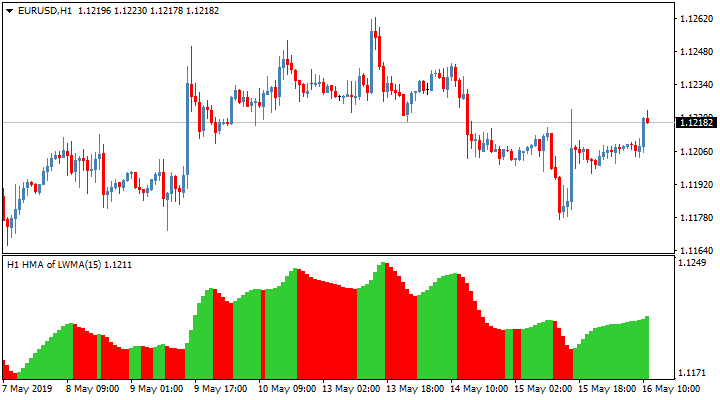
What sets this version apart is its unique Mountain Histogram display. Instead of a simple line, the indicator converts HMA signals into a colour-coded histogram that shows trend direction and strength through bar height and colour. Green bars indicate bullish momentum, red bars indicate bearish momentum, and the height of each bar represents trend strength.
The indicator also features Multi-Timeframe (MTF) mode, 33 different price types, 6 types of Hull Moving Average, vertical lines for visual clarity, and a fully customisable alert system — making it one of the most versatile Hull Moving Average indicators available.
2. Key Features of Hull Moving Average Mountain Histogram
The Hull Moving Average Mountain Histogram indicator is packed with features designed to give you an edge in trend identification and market analysis:
- Hull Moving Average Technology — Virtually eliminates lag while maintaining smoothness, providing faster and more accurate trend signals
- Mountain Histogram Display — Converts HMA signals into a colour-coded histogram in the basement window for easy visual interpretation
- MTF (Multi-Timeframe) Mode — View HMA signals from higher timeframes on your current chart for better trend context
- 33 Price Types — Choose from 33 different price data sources including Close, Open, High, Low, Median, Typical, and Weighted
- 6 HMA Types — Select from 6 different Hull Moving Average calculation methods
- Customisable Alert System — Set alerts for trend changes, price crossovers, and other conditions
- Vertical Lines — Visual markers that help identify key levels and transitions
- Works on Any Timeframe — From M1 to Monthly charts
- Works on Any Symbol — Forex, commodities, indices, and more
- Compatible with MT4 and MT5 — Available for both platforms
- Completely Free — No hidden fees, no limitations
3. Hull Moving Average Mountain Histogram for MetaTrader 4 (MT4)
The MT4 version of the Hull Moving Average Mountain Histogram indicator is fully compatible with MetaTrader 4, the world’s most popular trading platform. It integrates seamlessly into the MT4 environment and can be used alongside any other indicators or expert advisors.
Key benefits of the MT4 version:
- Runs on all MT4 builds (including the latest versions)
- Supports all MT4 timeframes (M1 to MN1)
- Can be combined with other MT4 indicators for confirmation
- Lightweight and fast — does not slow down your platform
- Easy to install — copy to the MQL4/Indicators folder
4. Hull Moving Average Mountain Histogram for MetaTrader 5 (MT5)
The MT5 version of the Hull Moving Average Mountain Histogram indicator is optimised for MetaTrader 5, the next-generation trading platform. It takes full advantage of MT5’s advanced features while maintaining the same core functionality and accuracy as the MT4 version.
Key benefits of the MT5 version:
- Optimised for MT5’s multi-threaded architecture
- Supports all MT5 timeframes and symbols
- Works with MT5’s advanced charting and analysis tools
- Compatible with MT5’s automated trading features
- Installation is simple — copy to the MQL5/Indicators folder
5. Technical Specifications
Below is a complete breakdown of the Hull Moving Average Mountain Histogram indicator’s technical specifications.
| Specification | Details |
|---|---|
| Indicator Name | Hull Moving Average Mountain Histogram |
| Type | Hull Moving Average / Histogram Trend Indicator |
| Platform | MetaTrader 4 (MT4) & MetaTrader 5 (MT5) |
| Base Indicator | Hull Moving Average (HMA) |
| Display Mode | Histogram in basement window |
| Key Features | MTF mode, 33 price types, 6 HMA types, Vertical lines, Customizable alerts |
| Timeframe | Any (M1 to MN1) |
| Currency Pairs | Any |
| Chart Type | Any |
| License | Free |
| Price | $0.00 |
📌 The Hull Moving Average Mountain Histogram combines zero-lag HMA technology with a visual histogram display for easy trend identification.
6. What Is the Hull Moving Average (HMA)?
The Hull Moving Average (HMA) is an advanced technical indicator developed by Australian trader and mathematician Alan Hull in 2005. It was designed to address the most significant limitation of traditional moving averages — lag.
Traditional moving averages like the Simple Moving Average (SMA) and Exponential Moving Average (EMA) are inherently lagging indicators. By the time they signal a trend change, price may have already moved significantly. The Hull Moving Average solves this problem by using a clever mathematical approach:
- It calculates a weighted moving average (WMA) with period n/2
- It calculates a WMA with period n
- It calculates the difference between these two (2 × WMA(n/2) − WMA(n))
- It then calculates the square root of n (√n) to determine the final period
The result is a moving average that is virtually lag-free while maintaining excellent smoothness. This makes the HMA one of the fastest and most responsive trend indicators available, capable of identifying trend changes much earlier than traditional moving averages.
Key advantages of the HMA include:
- Almost Zero Lag — Responds to price changes almost immediately
- Excellent Smoothing — Reduces noise without sacrificing responsiveness
- Early Trend Signals — Catches trend reversals earlier than SMA or EMA
- Reliable Support/Resistance — Acts as dynamic support and resistance in strong trends
7. Understanding the Mountain Histogram Display
The Mountain Histogram display is what makes this indicator truly unique. Instead of displaying the Hull Moving Average as a line on the price chart, it converts HMA signals into a colour-coded histogram displayed in the basement window below the chart.
How to read the Mountain Histogram:
- Green Bars: Indicate a bullish trend. The taller the bar, the stronger the bullish momentum.
- Red Bars: Indicate a bearish trend. The taller the bar, the stronger the bearish momentum.
- Bar Height: Represents the strength of the trend. Taller bars = stronger momentum.
- Color Change: When the histogram changes from green to red or red to green, it signals a potential trend reversal.
- Zero Line: The central line where the histogram crosses from positive to negative (or vice versa).
Key Display Features:
- 33 Price Types: Choose from 33 different price sources including Close, Open, High, Low, Median, Typical, Weighted, and various combinations. This allows you to fine-tune the indicator for any trading style.
- 6 HMA Types: Select from 6 different Hull Moving Average calculation methods, each with unique characteristics for different market conditions.
- MTF Mode: Display HMA signals from higher timeframes (TF+1, TF+2, TF+3) on your current chart to identify the larger trend context.
- Vertical Lines: Visual markers that help identify key levels and transitions in the histogram.
- Customizable Alerts: Set alerts for trend changes, price crossovers, and other important conditions.
This visual approach makes it much easier to spot trends and reversals at a glance compared to traditional line-based moving averages.
8. How to Use Hull Moving Average Mountain Histogram
The Hull Moving Average Mountain Histogram is designed to be intuitive and powerful. Follow these guidelines to get the most out of this advanced trend tool.
Reading the Signals
- Bullish Signal: Green histogram bars above the zero line, increasing in height. The MTF mode (if enabled) shows higher timeframe HMAs also pointing upward.
- Bearish Signal: Red histogram bars below the zero line, increasing in height. The MTF mode (if enabled) shows higher timeframe HMAs also pointing downward.
- Reversal Signal: When the histogram changes from green to red or red to green, it signals a potential trend reversal.
- Momentum Strength: The height of the bars indicates the strength of the trend. Taller bars = stronger momentum.
Entry and Exit Rules
- Entry: Enter a buy trade when the histogram turns green and bars are increasing in height, with higher timeframe HMAs confirming the bullish trend. Enter a sell trade when the histogram turns red and bars are increasing in height, with higher timeframe HMAs confirming the bearish trend.
- Stop Loss: Place your stop loss just below the recent swing low for buy trades, or just above the recent swing high for sell trades.
- Take Profit: Set your take profit at a key support or resistance level, or exit when the histogram bars begin to shrink (indicating loss of momentum).
- Exit: Close your position when the histogram changes color (green to red for buy trades, red to green for sell trades).
Trading Strategies with Hull Moving Average Mountain Histogram
- Multi-Timeframe Trend Following: Use the MTF mode to confirm the trend direction across higher timeframes. Only take trades in the direction of the higher timeframe HMAs.
- Reversal Trading: Watch for color changes in the histogram. When the indicator changes from green to red or red to green, it signals a potential trend reversal.
- Momentum Trading: Enter trades when the histogram bars are increasing in height (accelerating momentum) and exit when they begin to shrink (decelerating momentum).
- Breakout Confirmation: Use the histogram to confirm breakouts. When price breaks a key level and the histogram confirms the direction with strong momentum, the breakout is more likely to succeed.
9. How to Install Hull Moving Average Mountain Histogram in MT4 & MT5
Installing the Hull Moving Average Mountain Histogram indicator is quick and straightforward. Follow the steps below for your specific platform.
Installation for MetaTrader 4 (MT4)
- Download the indicator file from this page for free.
- Open your MetaTrader 4 platform.
- Go to
File → Open Data Folder. - Navigate to
MQL4 → Indicators. - Copy the indicator file into the Indicators folder.
- Restart MetaTrader 4.
- Drag the indicator from the Navigator panel onto your chart.
Installation for MetaTrader 5 (MT5)
- Download the indicator file from this page for free.
- Open your MetaTrader 5 platform.
- Go to
File → Open Data Folder. - Navigate to
MQL5 → Indicators. - Copy the indicator file into the Indicators folder.
- Restart MetaTrader 5.
- Drag the indicator from the Navigator panel onto your chart.
10. Hull Moving Average Mountain Histogram Settings and Configuration
The Hull Moving Average Mountain Histogram offers a range of customizable parameters. Below are the recommended settings for optimal performance.
| Parameter | Recommended Value | Description |
|---|---|---|
| HMA Type | 1-6 | Type of Hull Moving Average to use |
| Price Type | Close or HL/2 | Price data for calculation (33 options available) |
| Period | 14-20 | HMA calculation period |
| MTF Mode | Enabled | Display higher timeframe signals |
| Vertical Lines | Enabled | Show vertical lines on histogram |
| Alerts | Enabled | Set alerts for trend changes |
📌 These settings are a starting point. Experiment with different values to find what works best for your trading style and the instruments you trade.
11. Hull Moving Average Mountain Histogram Review: Pros and Cons
Here is an honest assessment of the Hull Moving Average Mountain Histogram indicator based on user feedback and real-world performance.
✅ Pros:
- Almost zero lag — HMA technology provides faster signals than traditional moving averages
- Visual histogram display — Makes trend identification easier and more intuitive
- 33 price types & 6 HMA types — Unmatched customisation options
- MTF capability — View higher timeframe trends on your current chart
- Customizable alerts — Never miss a trading opportunity
- Works on MT4 and MT5 — compatible with both platforms
- Completely free — no hidden fees or limitations
- Versatile — works on any timeframe and any instrument
❌ Cons:
- Requires practice — like any tool, it takes time to master
- Not a standalone system — works best with price action confirmation
- Best on higher timeframes — H1 and above recommended for optimal results
12. Comparison Table: Hull Moving Average Histogram vs Standard Moving Averages
How does the Hull Moving Average Mountain Histogram compare to traditional moving averages? This table highlights the key differences.
| Feature | Hull Moving Average Histogram | Simple Moving Average (SMA) | Exponential Moving Average (EMA) |
|---|---|---|---|
| Platform | MT4 & MT5 | MT4 & MT5 | MT4 & MT5 |
| Lag | Very Low (almost zero) | High | Medium |
| Smoothing | Excellent | Good | Medium |
| Display | Histogram + MTF mode | Line only | Line only |
| Price Types | 33 types | Limited | Limited |
| HMA Types | 6 types | 1 type | 1 type |
| Customizable Alerts | ✅ Yes | ❌ No | ❌ No |
| Price | Free | Free | Free |
📌 The Hull Moving Average Mountain Histogram’s unique combination of zero-lag HMA technology, histogram display, and extensive customisation options makes it a powerful alternative to standard moving averages.
13. Frequently Asked Questions
What is the Hull Moving Average Mountain Histogram indicator?
The Hull Moving Average Mountain Histogram is a free zero-lag trend indicator for MT4 and MT5 that displays Hull Moving Average signals as a histogram in the basement window. It features MTF mode, 33 price types, 6 HMA types, and customizable alerts.
Is Hull Moving Average Mountain Histogram available for MT5?
Yes, the Hull Moving Average Mountain Histogram indicator is available for both MetaTrader 4 (MT4) and MetaTrader 5 (MT5). You can download the appropriate version from this page for free.
What is the Hull Moving Average (HMA)?
The Hull Moving Average (HMA) was developed by Alan Hull in 2005. It is designed to eliminate lag while maintaining smoothness, making it faster and more responsive than traditional moving averages like SMA or EMA.
What does the Mountain Histogram display show?
The Mountain Histogram display converts Hull Moving Average signals into a histogram shown in the basement window of the price chart. The histogram’s color and height indicate trend direction and strength.
What are the 33 price types available in this indicator?
The indicator offers 33 different price types for calculation, including Close, Open, High, Low, Median, Typical, Weighted, and various combinations, allowing traders to customise the indicator for any trading style.
What are the 6 types of Hull Moving Average?
The indicator includes 6 different HMA calculation methods, each with unique characteristics. These can be selected to match different market conditions and trading preferences.
What is the MTF mode in this indicator?
The MTF (Multi-Timeframe) mode allows the indicator to display Hull Moving Average signals from higher timeframes on your current chart, helping you identify the larger trend context.
How do I install the Hull Moving Average Mountain Histogram indicator?
Download the indicator file, copy it to the Indicators folder in your MetaTrader directory (MQL4/Indicators for MT4 or MQL5/Indicators for MT5), restart the platform, and drag the indicator onto your chart.
What currency pairs work with this indicator?
The Hull Moving Average Mountain Histogram indicator works with any currency pair, commodity, or index. It is particularly effective on major forex pairs like EURUSD, GBPUSD, and USDJPY.
Is Hull Moving Average Mountain Histogram free to use?
Yes, the Hull Moving Average Mountain Histogram indicator is completely free to download and use. There are no hidden fees or limitations.
📈 See moving averages in action: The Hull Moving Average Mountain Histogram is a powerful trend indicator, but understanding how price respects moving average levels is essential. Our analysis of how USDJPY rebounds but gets capped by the 50-day SMA shows real-world examples of dynamic resistance — a concept that applies equally to the Hull Moving Average’s levels.
📊 Combine technical and fundamental analysis: While the Hull Moving Average Mountain Histogram provides powerful technical signals, combining it with fundamental analysis can improve your edge. Learn about the Consumer Sentiment Index — a key contrarian indicator that can help you understand market psychology and time your entries when the histogram signals align with sentiment extremes.

 Signal2forex.com - Best Forex robots and signals


Reviews
There are no reviews yet.